PAG.
35
rev 1.1
ENGLISH
TOOLS
6.4.3. S/W UPGRADE BY OTA
This function can upgrade the software of your receiver through
data sent by a satellite. At the moment we offer satellite updates
only through ASTRA1 satellite.
1. Select the satellite and TP or input the TP value and
download PID.
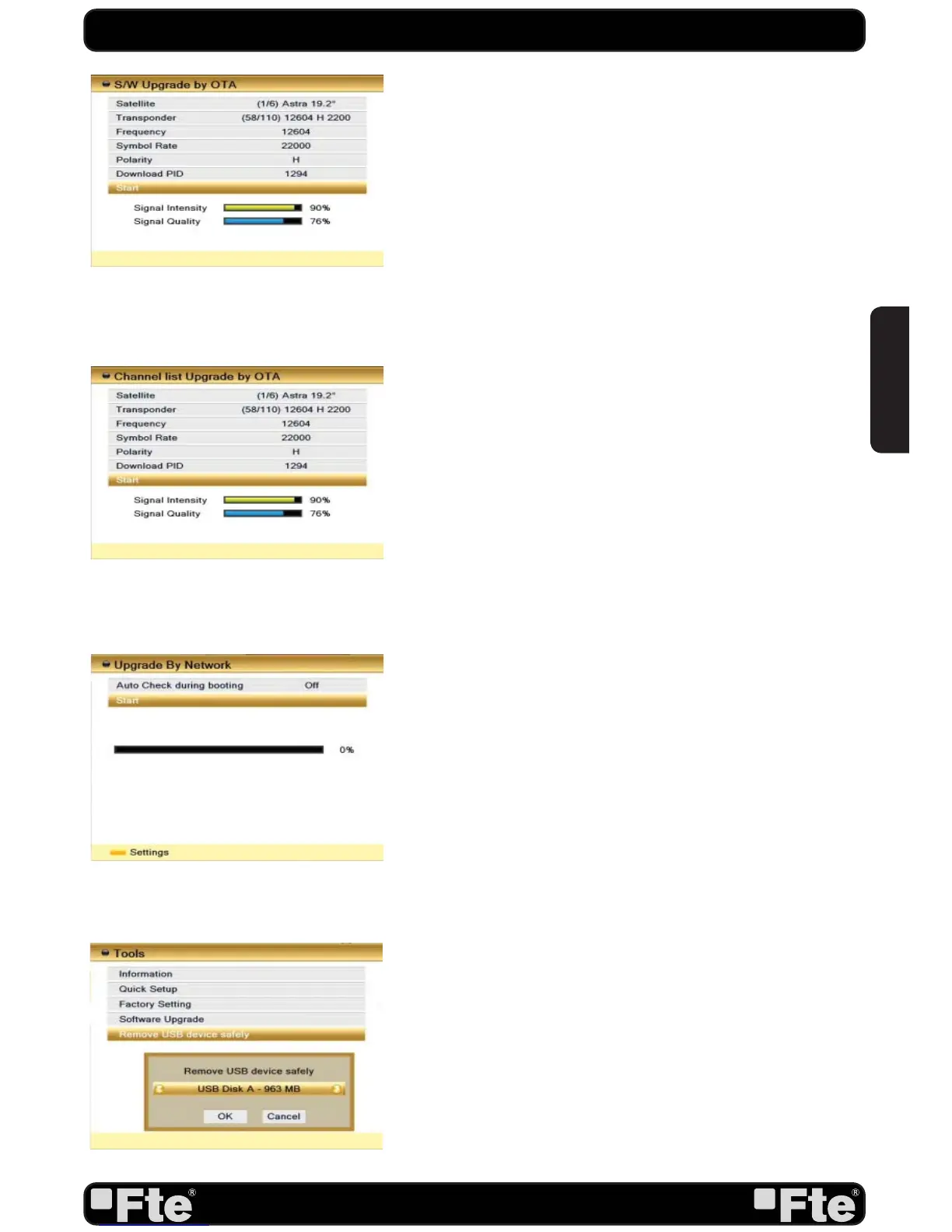
2. Then mark “Start” and press [Enter] to begin the download
of the upgrade (OSD 78). This may need up to 60 Minutes.
Therefore we suggest using of this function only if you don’t
intent to watch TV during this time.
At the moment of writing this manual, the data for the software
upgrade by Satellite is:
•Satellite: Astra
•TP Frequency: 12604 MHz.
•Symbol Rate: 22000
•Polarity: Horizontal
•Download PID: 1294
For changes in the data of the satellite please visit http://www.
universbyfte.com .
6.4.4. CHANNEL LIST UPGRADE BY OTA
This function can upgrade the channel list of your receiver
through data sent by a satellite. At the moment we offer satellite
updates only through ASTRA1 satellite.
1. Select the satellite and TP or input the TP value and
download PID.
2. Then mark “Start” and press [Enter] to begin the download
of the upgrade (OSD 79). This may need up to 60 Minutes.
Therefore we suggest using of this function only if you don’t
intent to watch TV during this time.
At the moment of writing this manual, the data for the software
upgrade by Satellite is:
•Satellite: Astra
•TP Frequency: 12604 MHz.
•Symbol Rate: 22000
•Polarity: Horizontal
•Download PID: 1294
For changes in the data of the satellite please visit http://www.
universbyfte.com .
6.4.5. UPGRADE BY NETWORK
This function can upgrade the software of your receiver through
internet (OSD 80).
6.5. REMOVE USB DEVICE SAFELY
In “Tools” menu, select “Remove USB Device safely”,press
“OK”, to disconnect USB device of receiver (OSD 81).
OSD 78
OSD 79
OSD 80
OSD 81


 To Next Page