PAG.
22
rev 1.1
ENGLISH
3.4. FAVOURITE LIST NAME
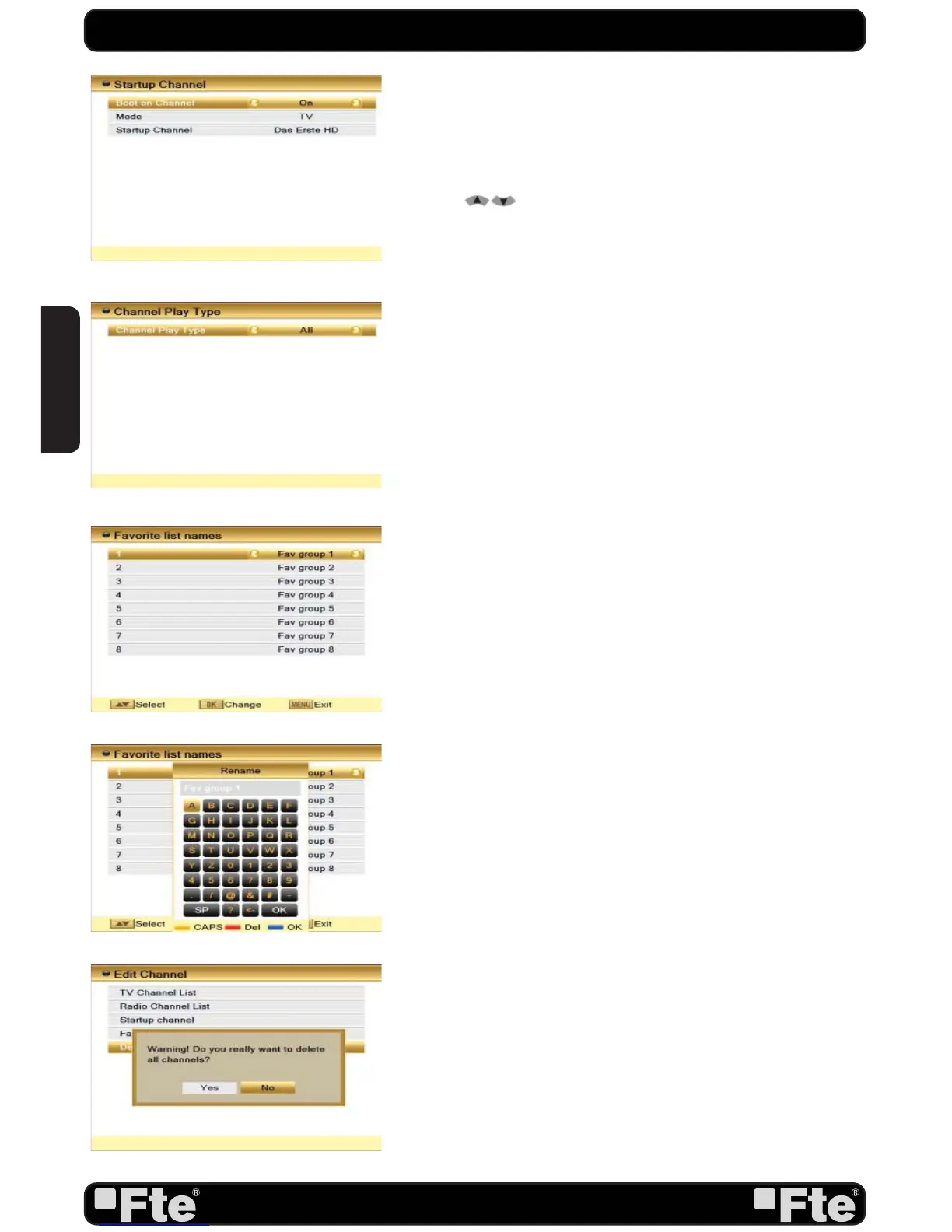
In this menu, user is able to change the name of the Favourite
Groups. Press [OK] to enter this menu and you will see a
screen like beside (OSD 30).
To change the name of the Favourites Groups:
1. Press [
] and select a Favorite Group.
2. Press [Ok] button to edit the name of the Group.
3. Once the name is correct, select “Ok” option and confirm
pressing [OK] (OSD 31).
4. If the name is used by other group, an alert message will
appear on the TV.
5. Select “Exit” and press [OK] to leave this menu.
3.5. DELETE ALL
To delete all channels:
1. A safety question will show up where you have to confirm
first (OSD 32).
3. Select “Yes” to delete all channels or “No” to cancel and
confirm with [OK].
4. Pressing [Exit] will exit the function directly without saving.
? FREQUENTLY ASKED QUESTION
Q: IF I incautiously delete all channels, what should I do?
A: There are three ways to restore:
- To re-search all channels at the “Installation” menu.
- Use “Factory Default” function to restore all channels in the
“Tools” menu. The receiver will load the factory channels.
- Using the option of the tool menu “updating software” “Backup
USB”.
CHANNEL
OSD 28
OSD 29
OSD 30
OSD 31
OSD 32


 To Next Page