PAG.
28
rev 1.1
ENGLISH
5. SYSTEM SETUP
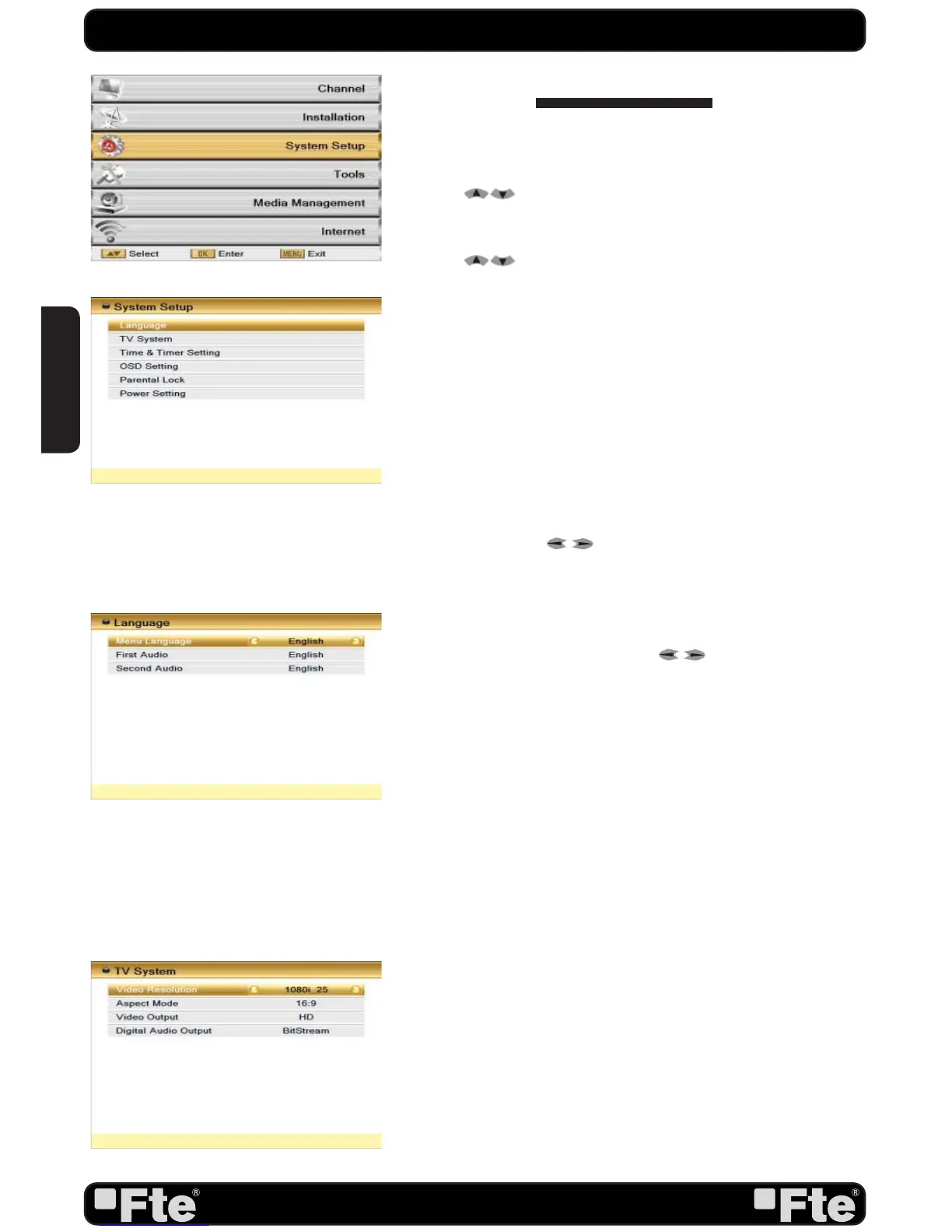
Press [Menu] in the TV mode to enter the main menu (OSD
53).
1. Press [
] to select the System Setup item.
2. Press [OK] to enter the selected item.
In the System Setup menu (OSD 54):
3. Press [
] to select the wanted menu item.
4. Press [OK] to enter the selected item among.
- Language
- TV System
- Time & Timer Setting
- OSD Setting
- Parental Lock
- Power setting
5.1. LANGUAGE
After selecting the “Language” menu you will see a window like
beside (OSD 55):
1. Language: press [
] to select languages. The selection
of languages include: English, German, French, Spanish, Italian,
Portuguese, Turkish, Russian, Dutch, Arabic and Farsi.
2. First Audio: Some channels offer more than one audio
language. This function allows you to set the preferred audio
language for those channels using [
]. If a channel offers
the same audio language as the “First Audio” you set the
system will play this audio language as default. If the channel
does not offer this audio language then the system will compare
the offered languages with the second audio language. The
selections of audio languages include: English, German,
French, Spanish, Italian, Portuguese, Turkish, Russian, Dutch,
Arabic and Farsi.
3. Second Audio: If the channel has no audio language that
corresponds with “First Audio” but with “Second Audio” the
system will play the second audio language as default. If no
audio language corresponds with the “Second Audio” then the
default language of the current channel will be played instead.
The selections of audio languages include: English, German,
French, Spanish, Italian, Portuguese, Turkish, Russian, Dutch,
Arabic and Farsi.
4. Press [Exit] to return back from “Language” menu.
5.2. TV SYSTEM
When you enter the “TV System” menu you will see the screen
like below (OSD 56):
1. Display Mode is used to switch the display mode. You can
select from AUTO, TV,
480I, 480P, 576I, 576P, 720P_50,
OSD 53
OSD 56
SYSTEM SETUP
OSD 54
OSD 55


 To Next Page