PAG.
20
rev 1.1
ENGLISH
3.1.3. SORT
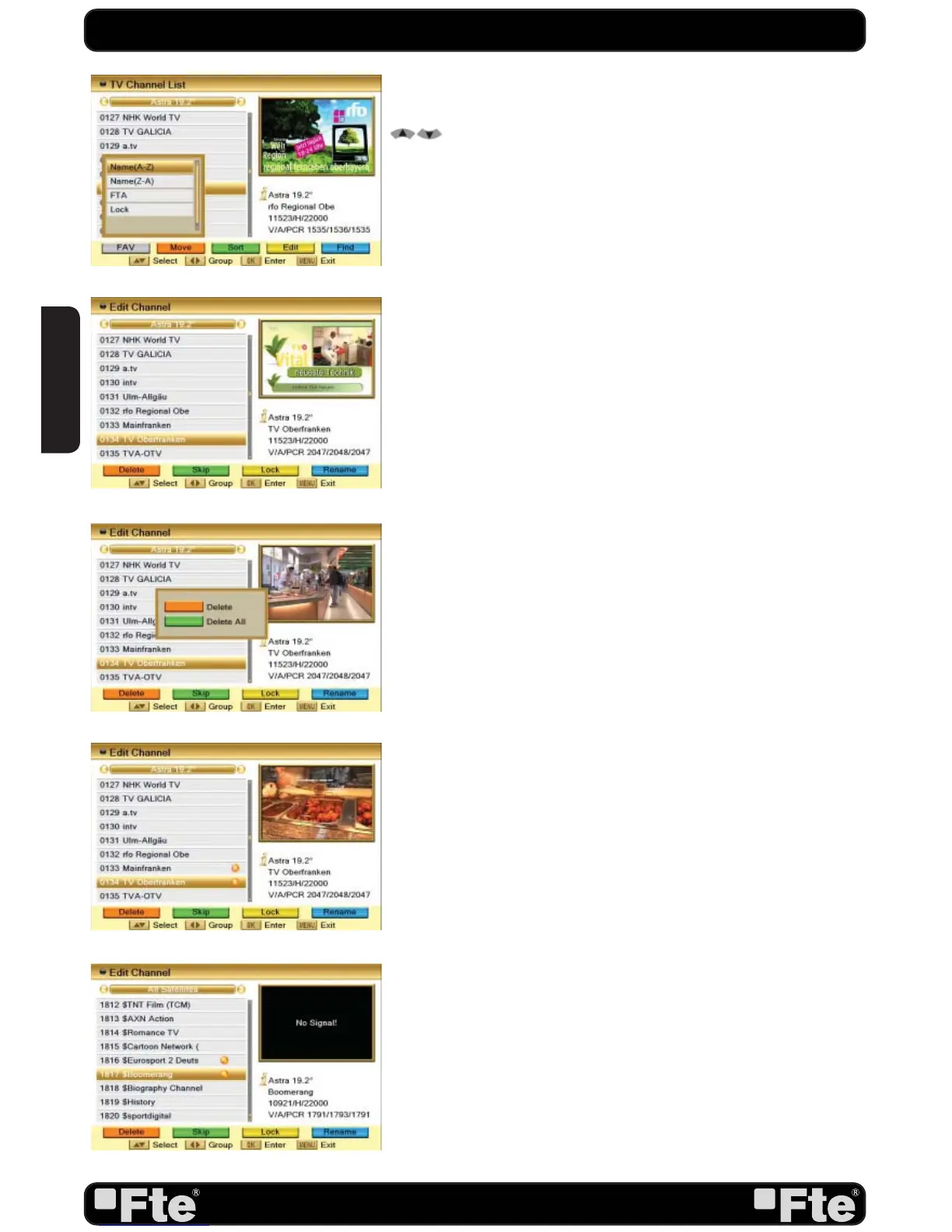
1. Press [Green] to open the Sort window (OSD 18). Press [
] to select and [OK] to confirm your choice.
2. The ways of sorting are:
- Name (A-Z): Sorting in Alphabetical Order, ignoring “$” sym-
bol.
- Name (Z-A): Sorting in Alphabetical Order, ignoring “$” sym-
bol.
- FTA: Sort channel by free and scrambled sequence. Free
channels will be listed first and scrambled channels behind
in the channel list.
- Lock: Unlocked channels are listed first end locked channels
at the end.
3.1.4. EDIT
1. After pressing the [Yellow] button a window for entering the
password will open. The default password is “0000”.
2. You can Delete, Skip, Lock and Edit the channel (OSD
19).
3. Press [Exit] to leave the Channel Editing. The system will ask
you to confirm the saving of the changes you made.
3.1.4.1 DELETE
In Channel Edit menu press [Red] button to mark a channel
for deleting.
A confirmation of deleting one or all channels from the list is
displayed (OSD 20):
- Please, confirm pushing the [Red] button to select the channels
one by one. Only the selected channels will be deleted.
- Confirm pushing the [green] button to select all the channels
from the list.
Marked channels (OSD 21) will be deleted after you confirm to
save the changes when you leave this menu.
3.1.4.2 SKIP
In Channel Edit menu, press [Green] button to place a Skip icon
behind the name of the highlighted channel. Marked channels
(OSD 22) will be skipped when you change channels in TV
mode after you confirm to save the changes when you leave
this menu.
3.1.4.3 LOCK
In Channel Edit menu, press [Yellow] button to place a Lock icon
behind the name of the highlighted channel. Marked channels
(OSD 23) will be locked and displayed only after password has
been entered if you confirm to save the changes when you
leave this menu.
CHANNEL
OSD 18
OSD 19
OSD 21
OSD 20
OSD 22


 To Next Page