PAG.
19
rev 1.1
ENGLISH
CHANNEL
3. CHANNEL
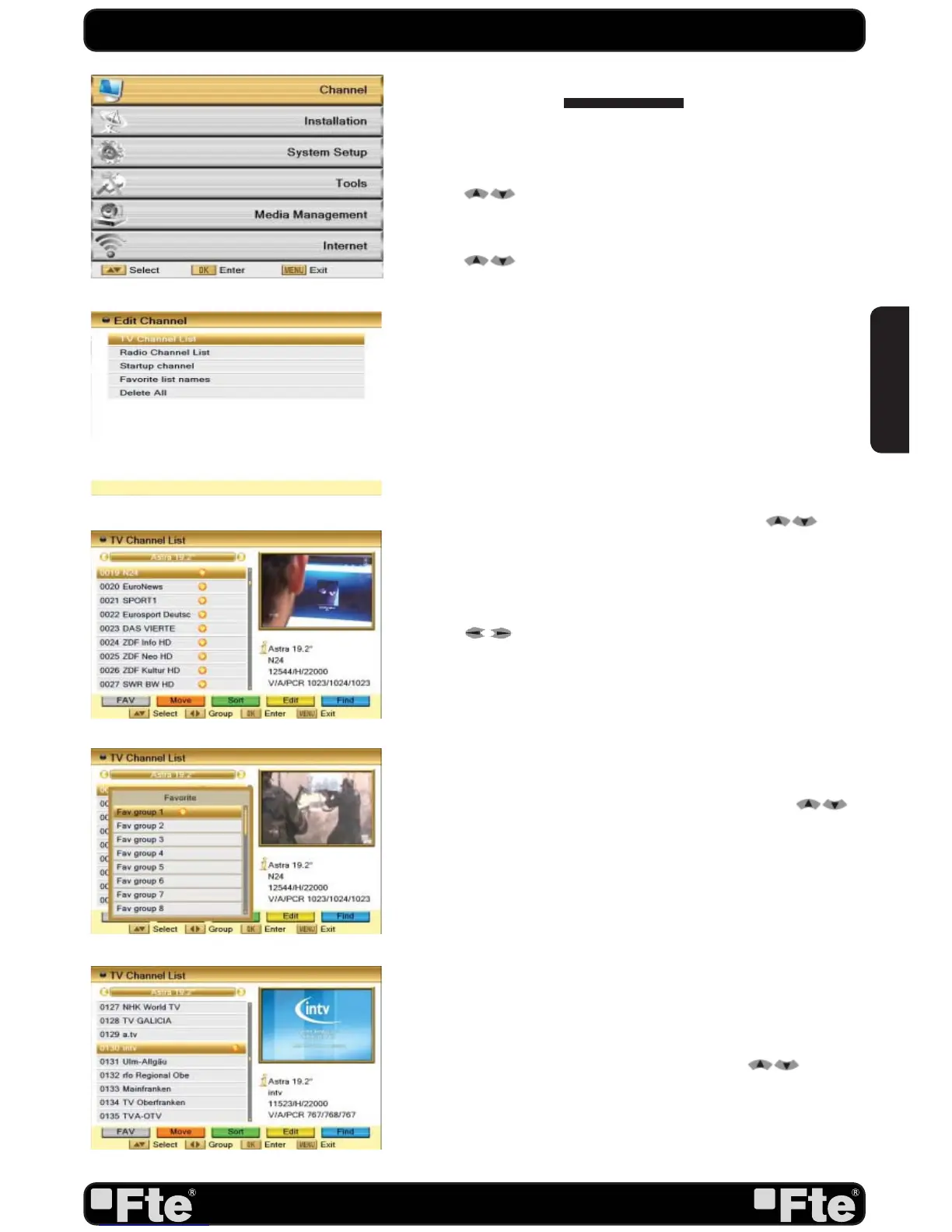
Press [Menu] in the TV mode to enter the main menu (OSD
13).
1. Press [
] to select the Channel item.
2. Press [OK] to enter the selected item.
In the Channel menu (OSD 14):
3. Press [
] to select the wanted menu item.
4. Press [OK] to enter the selected item among.
- TV Channel List
- Radio Channel List
- Channel setup
- Favourite channel list name
- Delete All
3.1. TV CHANNEL LIST
If you enter the Channel List menu a window like the one
besides will open (OSD 15).
1. You can move the highlighted channel with [
] and
press [OK] to preview the highlighted program in the preview
window.
2. Press [Pup/Pdw] on the RCU to jump between the channels
by pages.
3. Press [
] to switch the Program Group.
4. The colour buttons offer further functions to manage the
channel list.
5. Press “Menu” to leave this menu.
3.1.1. FAVOURITE
1. Press [FAV] to open the Favourite window (OSD 16).
2. You can select between 32 favourites groups with [
].
Press [OK] to assign the channel to a Favourite group.
3. Press [OK] again to remove the channel from the marked
Favourite group.
4. Press [Exit] button to return to the TV Channel List. The
channels of Favourites Groups are indicated with a favourite
icon behind the name.
3.1.2. MOVE
To move channels: Pushing the [Red] button, you will see a
picture like OSD 17.
- Move the channel to the desired position with [
]. Press
[OK] to confirm the position.
OSD 13
OSD 14
OSD 15
OSD 16
OSD 17


 To Next Page