18 19
1
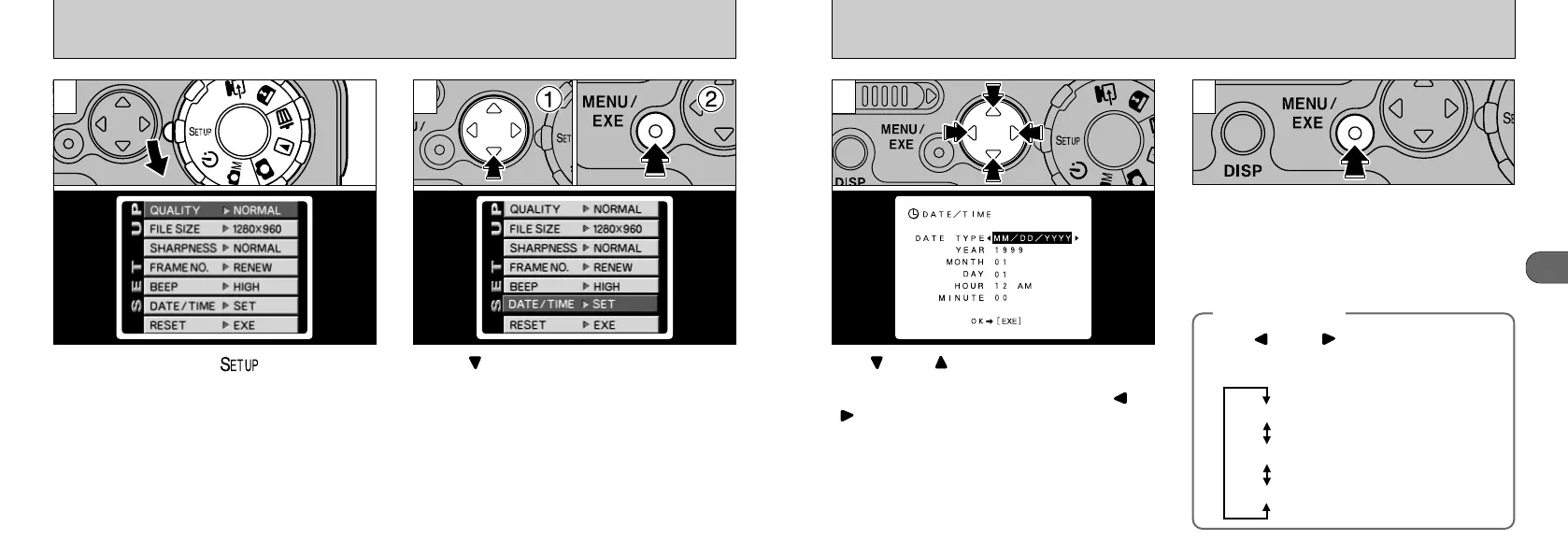
Use “” and “” on the 4-way button to select
the desired item (DATE TYPE, YEAR, MONTH,
DAY, HOUR or MINUTE) and then use “” or
“” to change the setting.
Once you have finished adjusting the date and
time, press the “MENU/EXE” button to apply the
new settings.
●
!
To set the time precisely, press the “MENU/EXE”
button when the time is at zero seconds.
3 4
●
!
When the time displayed passes “12:00:00”, the
AM/PM setting automatically switches.
SETTING THE DATE AND TIME
Set the Mode dial to “” to display the
SETUP screen.
Press “” on the 4-way button
➀
to select
“DATE/TIME” and then press the “MENU/EXE”
button
➁
.
2
●
!
See P.43 for details of the SETUP menu.
1
◆ DATE TYPE◆
Press “” and “” on the 4-way button to
select the display format of the date shown
on the LCD monitor.
MM/DD/YYYY: Month/Day/Year
DD/MM/YYYY: Day/Month/Year
YYYY/MM/DD: Year/Month/Day











 To Next Page