57
4
3
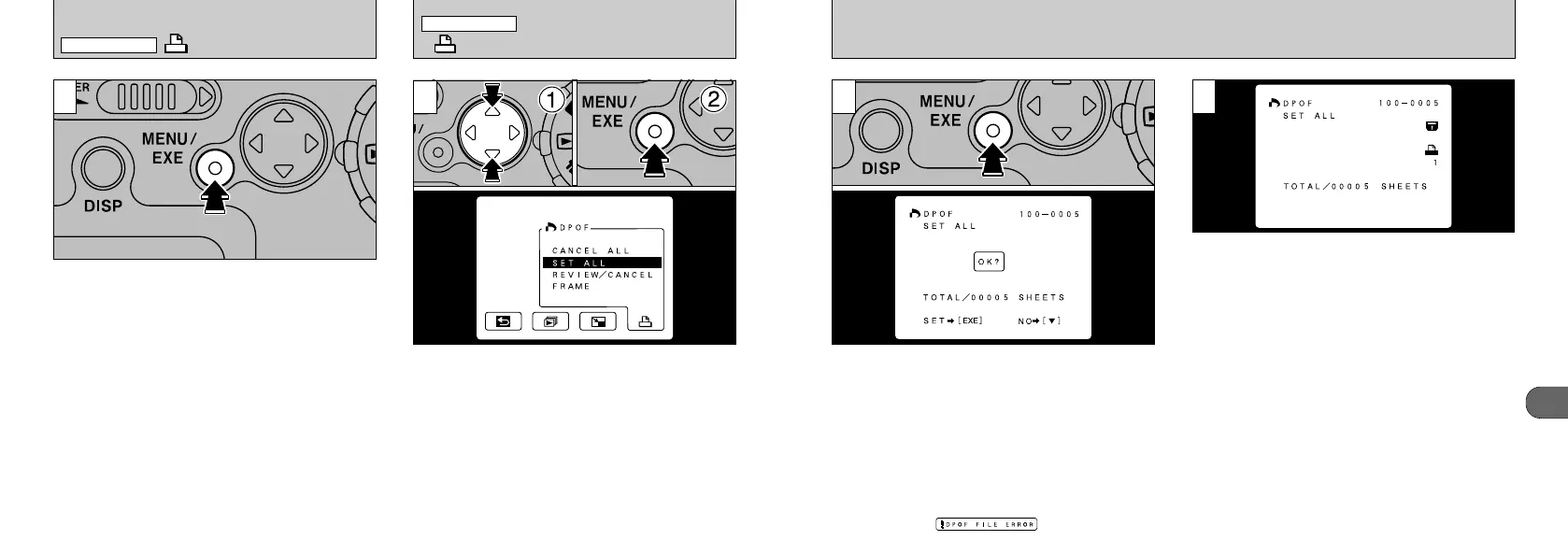
The total number of prints is displayed on the
LCD monitor and then the menu screen
reappears.
●
!
“TOTAL” shows the total number of prints specified.
●
!
If all the print specifications are cancelled, “TOTAL”
changes to “00000”. However, the frames are still
protected.
2
A confirmation screen appears. To continue,
press the “MENU/EXE” button.
●
!
“SET ALL” specifies printing of one print for each
image.
●
!
Even if prints have been specified for individual
frames, the specification is changed to one print for
every frame.
●
!
Prints can be specified for up to 999 frames on the
same SmartMedia card. If more than 999 frames are
specified, the “” warning appears.
56
3
To cancel a print specification, display the image
you want to cancel and press the “MENU/EXE”
button.
1
➀
Select “SET ALL” or “CANCEL ALL”.
➁
Press the “MENU/EXE” button.
DPOF SET ALL
/
CANCEL ALL
DPOF REVIEW
/
CANCEL
PLAYBACK MENU
PLAYBACK MENU










 To Next Page