59
5
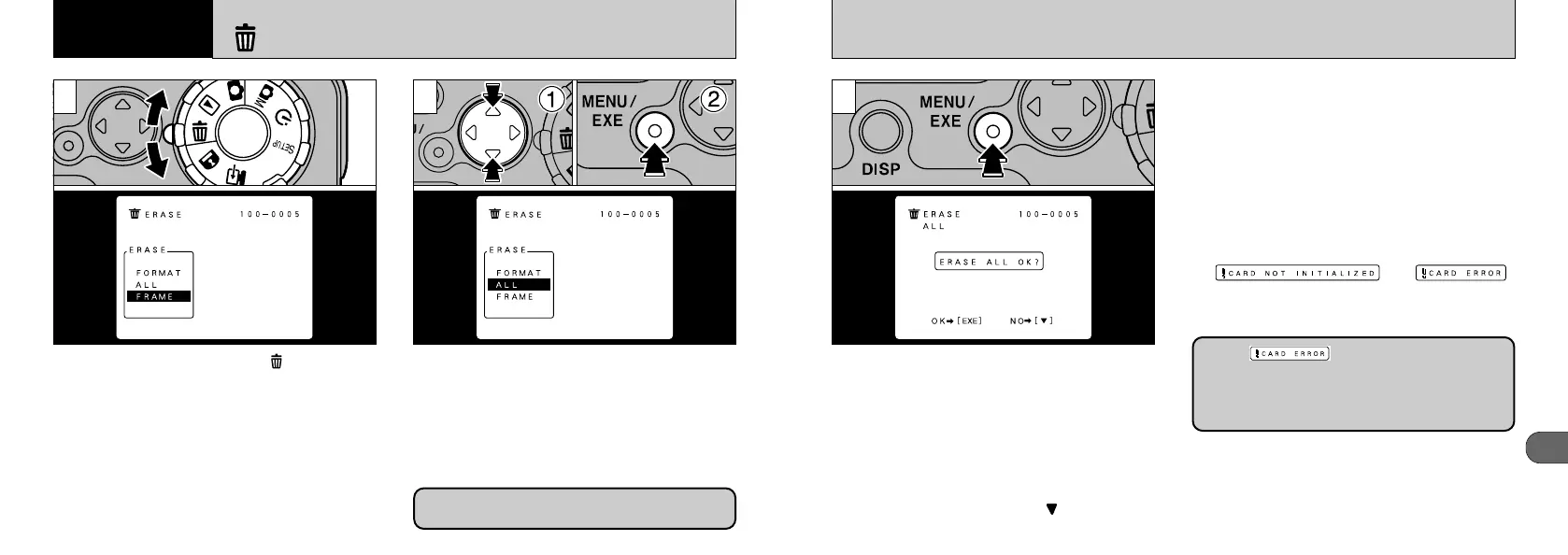
A confirmation screen appears. Press the
“MENU/EXE” button to proceed with erasing the
images or formatting the SmartMedia.
● ERASE ALL
This erases all of the images on the
SmartMedia.
✽ The directories and protected images will not be
erased.
● FORMAT
Erases all the data on the SmartMedia and
reformats (initializes) the card for use in the
camera.
Use this command when the
“” or “”
message is displayed.
✽ Formatting also erases protected images.
3
●
!
To cancel the erasing, press “” on the 4-way
button.
58
When you set the Mode dial to “”, the ERASE
menu appears on the LCD monitor.
➀
Select “ALL” or “FORMAT”.
➁
Press the “MENU/EXE” button.
ERASING ALL FRAMES
/
FORMATTING
21
Formatting erases all of the data on the
SmartMedia.
●
!
See P.29 for information on erasing single frames.
5
Advanced
Features Other
If the “” message is displayed, first
try wiping the contact area (gold-colored area) on
the card with a soft dry cloth and inserting the
card again. If the error message continuously
appears, format the SmartMedia.











 To Next Page