63
5
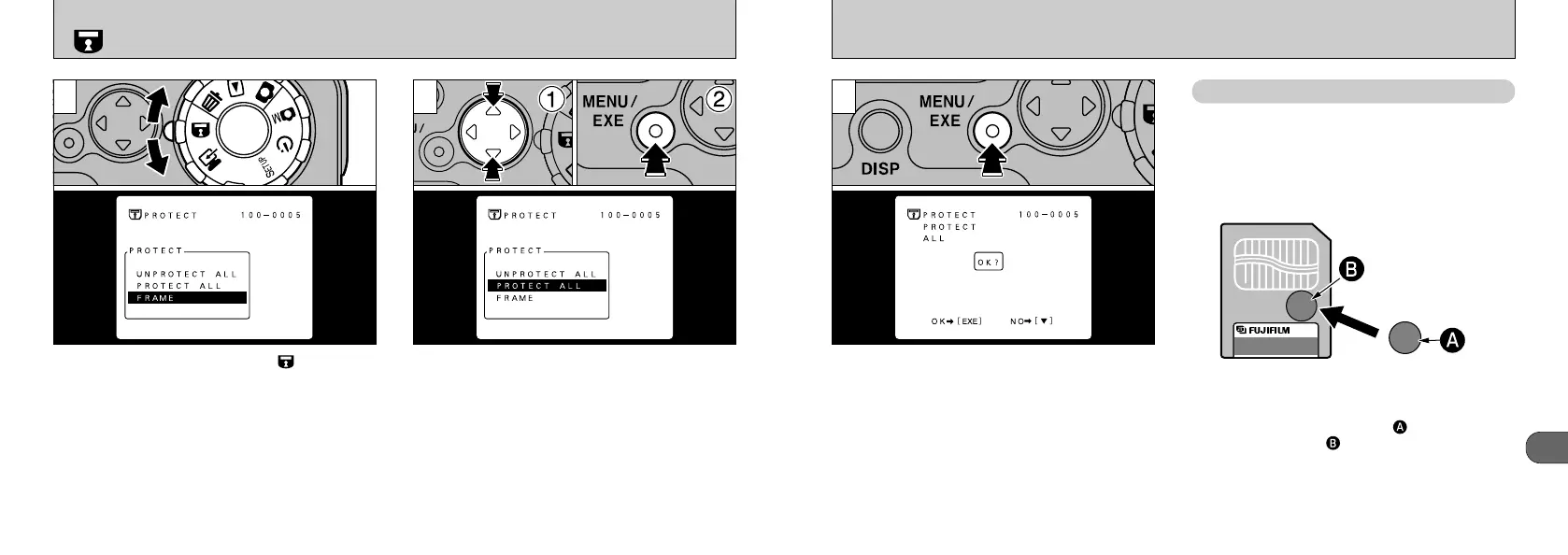
A confirmation screen will appear to proceed,
press the “MENU/EXE” button.
Attaching a write-protect sticker to a SmartMedia
ensures that you do not accidentally record or
erase images or format the SmartMedia. Peeling
off the sticker allows you to use the card
normally again.
●
!
Formatting erases all images, including protected
images. (➡P.58)
SmartMedia
TM
Write-Protection
3
✽ Ensure the write-protect sticker is attached within
the designated area .
✽ Be cautions not to get injured from the edge of the
write-protect sticker.
✽ The SmartMedia may not be write-protected if the
write-protect sticker is not clean.
✽ See P.72 for more information on SmartMedia.
62
When you set the Mode dial to “”, the menu
appears on the LCD monitor.
➀
Select “PROTECT ALL” or “UNPROTECT
ALL”.
➁
Press “MENU/EXE”.
SETTING AND REMOVING PROTECTION FOR ALL FRAMES
1 2
●
!
The protection cannot be cancelled for files specified
in the DPOF settings. Cancel the DPOF setting first.
(➡P.56)










 To Next Page