20 21
1
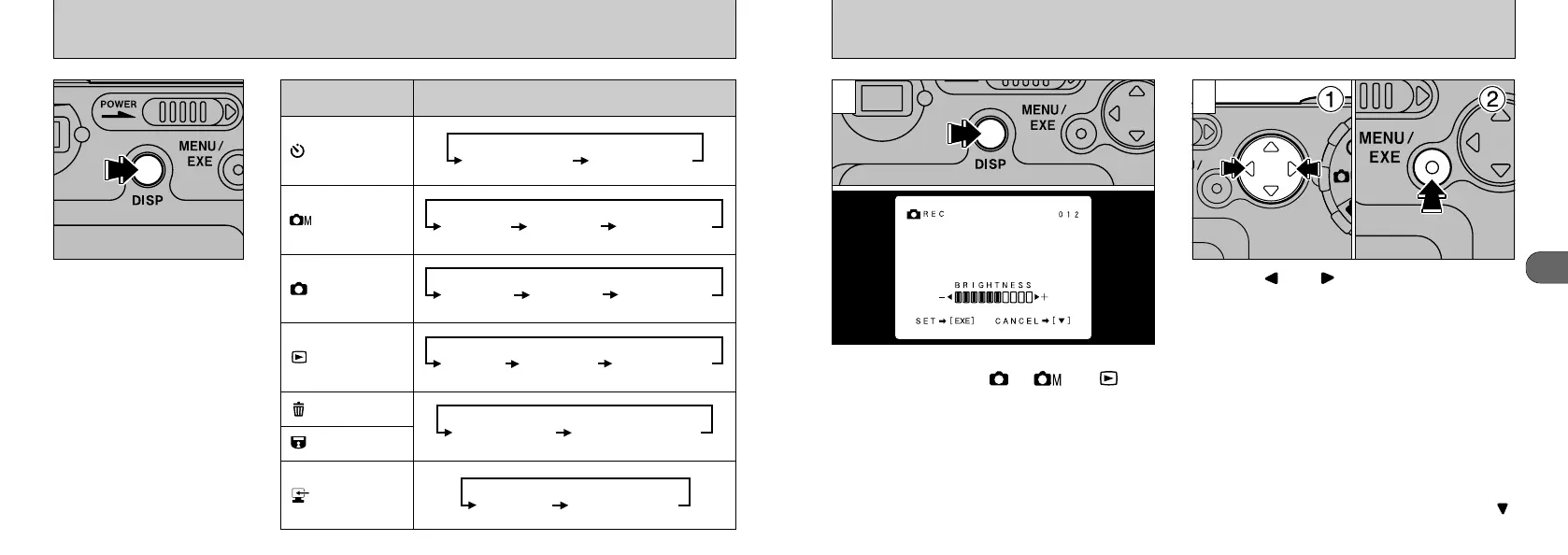
ADJUSTING THE LCD MONITOR BRIGHTNESS
You can set the LCD monitor brightness when
the Mode dial is set to “”, “” or “”.
Hold down the “DISP” button for approximately 2
seconds to display the brightness adjustment
screen.
➀
Press “” or “” on the 4-direction button
to adjust the brightness.
➁
Then press the
“MENU/EXE” button to apply the setting.
21
●
!
If you do not want to change the settings, press “”
on the 4-way button.
●
!
The brightness control is only available when text is
displayed on the LCD monitor. If the text is not
displayed, push the “DISP” button until text is
displayed.
SWITCHING THE LCD MONITOR DISPLAY
The display status of the
LCD monitor changes each
time you press the “DISP”
button. Operation differs
depending on the mode.
Mode
LCD Monitor Display Status
AUTO mode
Self-timer mode
Manual mode
Playback
Erase
Protect
PC










 To Next Page