Only use 3.3V SmartMedia.
2MB, MG-4S
(
4MB
)
MG-8S
(
8MB
)
, MG-16S
(
16MB
)
MG-32S
(
32MB
)
●
!
5V SmartMedia cannot be used with this camera.
●
!
Images cannot be recorded or erased if a write-
protect sticker is affixed to the SmartMedia (➡P.63).
●
!
Operation of this camera is only guaranteed when it
is used with Fujifilm SmartMedia.
●
!
Some 3.3V SmartMedia are labelled as “3V
”
cards.
●
!
See P.72 for more information on SmartMedia.
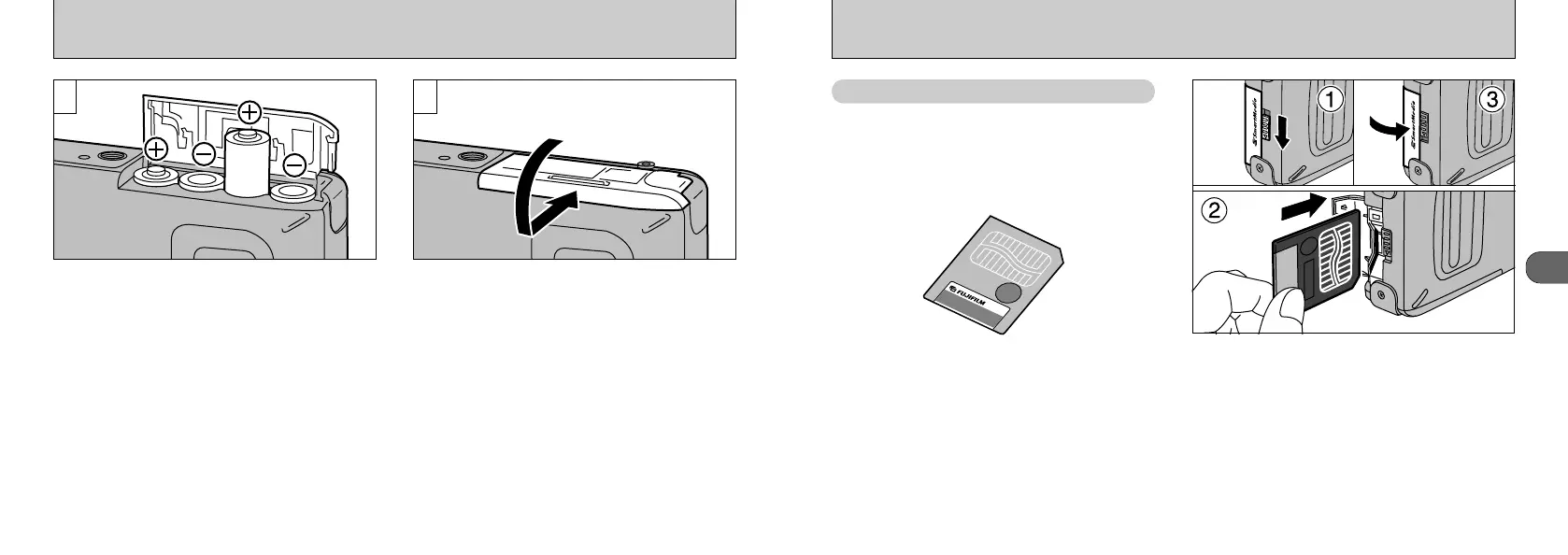
➀
Check that the camera is switched off and
then release the slot cover lock.
➁
Push the SmartMedia firmly into the
SmartMedia slot as far as it will go.
➂
Close the slot cover.
●
!
If you open the slot cover while the camera is
switched on, the camera is automatically switched
off to protect the SmartMedia.
●
!
The SmartMedia will not slide fully into the slot if it is
inserted facing the wrong way. Take care not to
apply undue force to the SmartMedia.
LOADING THE BATTERIES
Install the batteries with the correct polarity as
shown.
●
!
Take care not to drop the batteries when opening
and closing the battery cover.
Close the battery cover as indicated by the
arrow.
32










 To Next Page