31
2
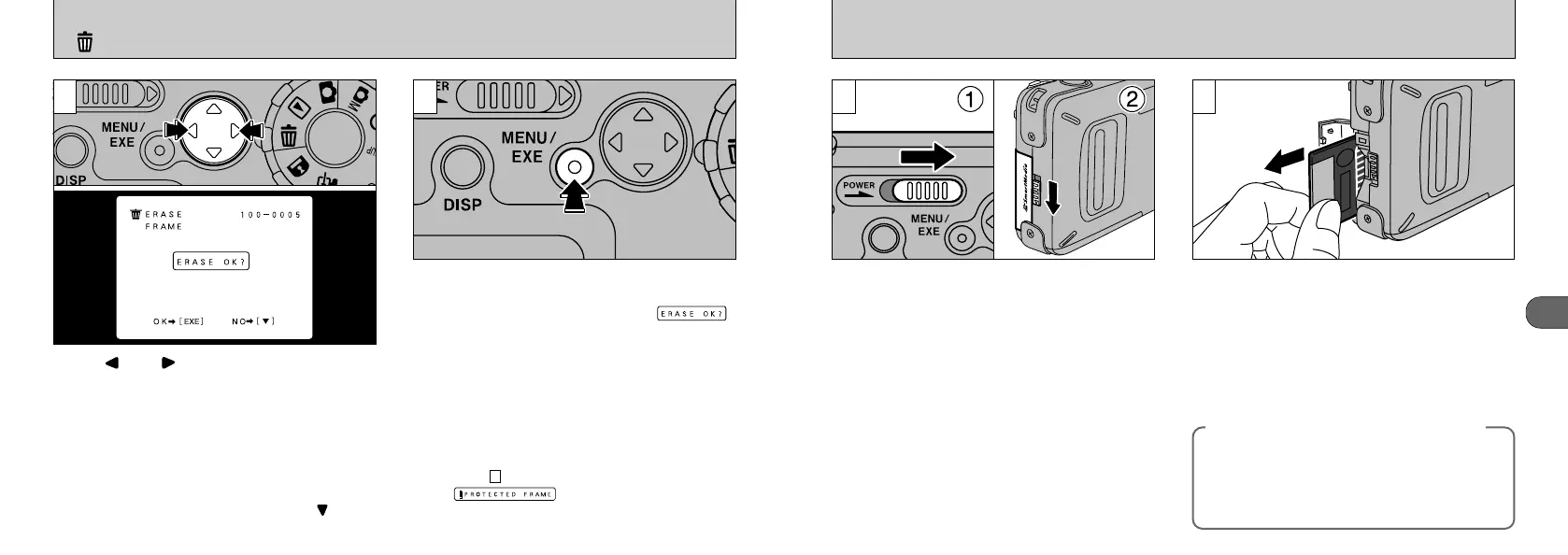
REMOVING THE SmartMedia
™
1 2
➀
Check that the camera is not recording data
and then switch the camera off.
➁
Release the SmartMedia cover lock.
●
!
Always switch the camera off before opening the slot
cover. Opening the slot cover while the camera is on
can corrupt the image data on the SmartMedia card
or damage the card itself.
Grip the SmartMedia and pull it out.
●
!
To protect the SmartMedia, always store it in the
special anti-static case.
●
See P.52, 65 for information on printing your
images.
●
See P.64 to 65 for information on downloading
your images to a personal computer.
◆
Printing Images and Downloading
Images to a Personal Computer
◆
30
ERASING SINGLE FRAME
4
Press “” or “” on the 4-direction button to
display the image to be erased.
Press the “MENU/EXE” button to erase the
displayed image. When erasing is complete, the
next image appears and the “”
message is displayed.
●
!
To cancel image erasing mid-way, press “” on the
4-way button.
●
!
To continue erasing images, repeat the procedure
from step .
●
!
If “” is displayed, the image
protection must be removed to erase the image
(➡P.60).
3
3










 To Next Page