49
4
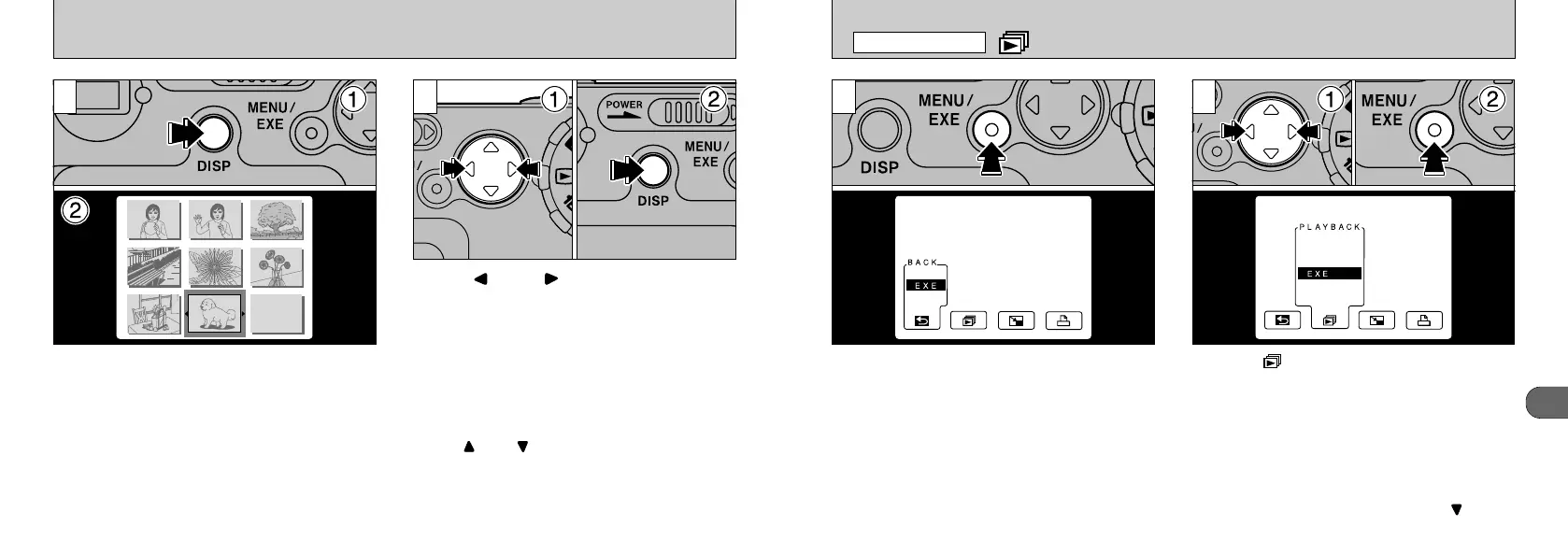
Press the “MENU/EXE” button to display the
menu on the LCD monitor.
➀
Select “ PLAYBACK” (automatic playback).
➁
Press the “MENU/EXE” button. The images
are automatically played back frame by
frame.
PLAYBACK
(
AUTOMATIC PLAYBACK
)
●
!
If the “DISP” button is pressed the text display will
appear on the LCD monitor. Date will not be
displayed.
●
!
To cancel automatic playback, press “” on the
4-way button when an image is displayed.
1 2
●
!
The Auto Power Off function does not operate during
PLAYBACK (automatic playback).
PLAYBACK MENU
48
➀
Press the “DISP” button twice during playback.
➁
The 9-shot multi-frame playback screen
appears.
➀
Use “” and “” on the 4-way button to
move the cursor (the orange frame) and
select a frame.
➁
To zoom in on the selected image, press the
“DISP” button again.
●
!
The
“
” and “” buttons are disabled during multi-
frame playback.
●
!
Multi-frame playback is particularly useful for
selecting images for single-frame erase, single-
frame protect, DPOF frame specification or DPOF
confirmation and cancellation.
1 2
●
!
The LCD monitor text display disappears after
approximately 3 seconds. The text cannot be
displayed in succession.
●
!
Playback zoom cannot be used with multi-frame
playback.
MULTI-FRAME PLAYBACK










 To Next Page