55
4
2
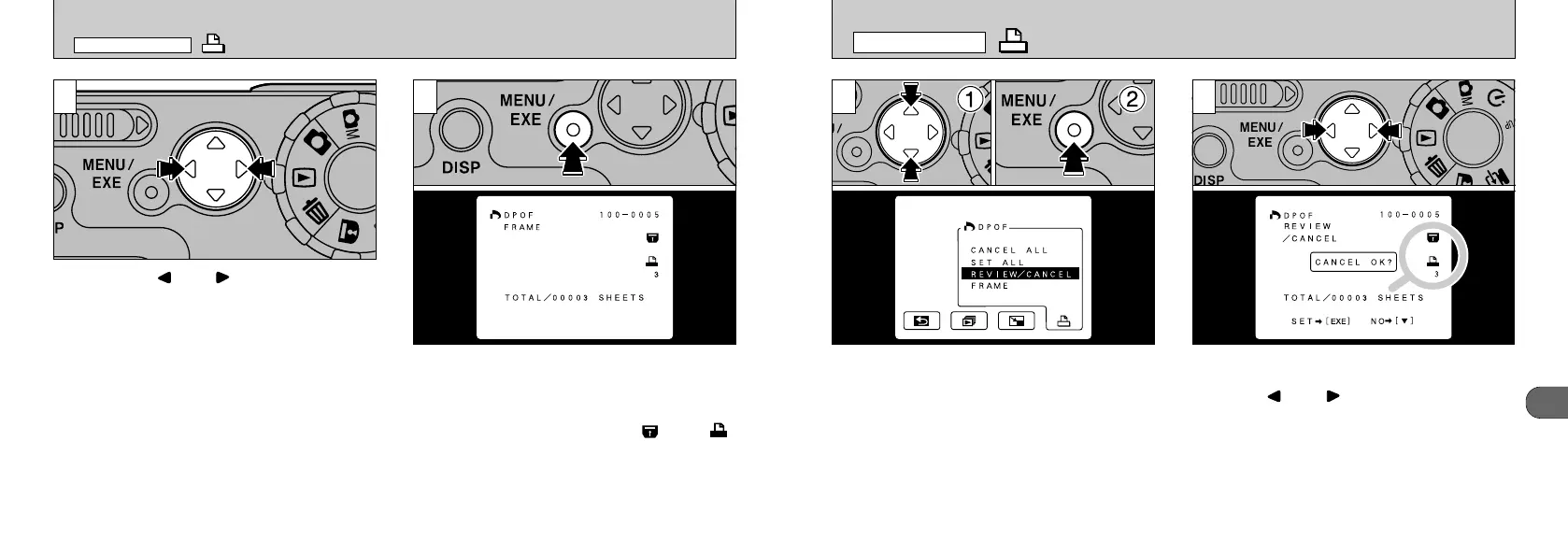
You can confirm the settings for only those
frames with a specified number of prints by
pressing “” or
“
”
. The settings for each
frame are displayed on the right of the screen.
●
!
Multi-frame playback is an easy way to select
images (➡P.48).
●
!
If all the print specifications are cancelled, “TOTAL”
shows “00000” and the background screen is black.
However, the frames are still protected.
1
➀
Select
“
REVIEW/CANCEL”.
➁
Press the “MENU/EXE” button.
DPOF REVIEW
/
CANCEL
PLAYBACK MENU
54
DPOF SET FRAME
PLAYBACK MENU
3 4
You can use “” or “” to display the next
frame and specify the number of prints.
Once the settings are complete, press the
“MENU/EXE” button to apply them. The total
number of prints is shown on the LCD monitor
and the menu reappears. The screen for a
confirmed frame also shows the “
”
and
“
”
icons and the number of prints specified.
●
!
If you did not press the “MENU/EXE” button, the
camera waits 10 seconds and then discards the
settings for the selected frame.
●
!
The specified number of prints is automatically
applied and the frames are protected to prevent the
information from being erased.
●
!
“TOTAL” shows the total number of prints specified.










 To Next Page