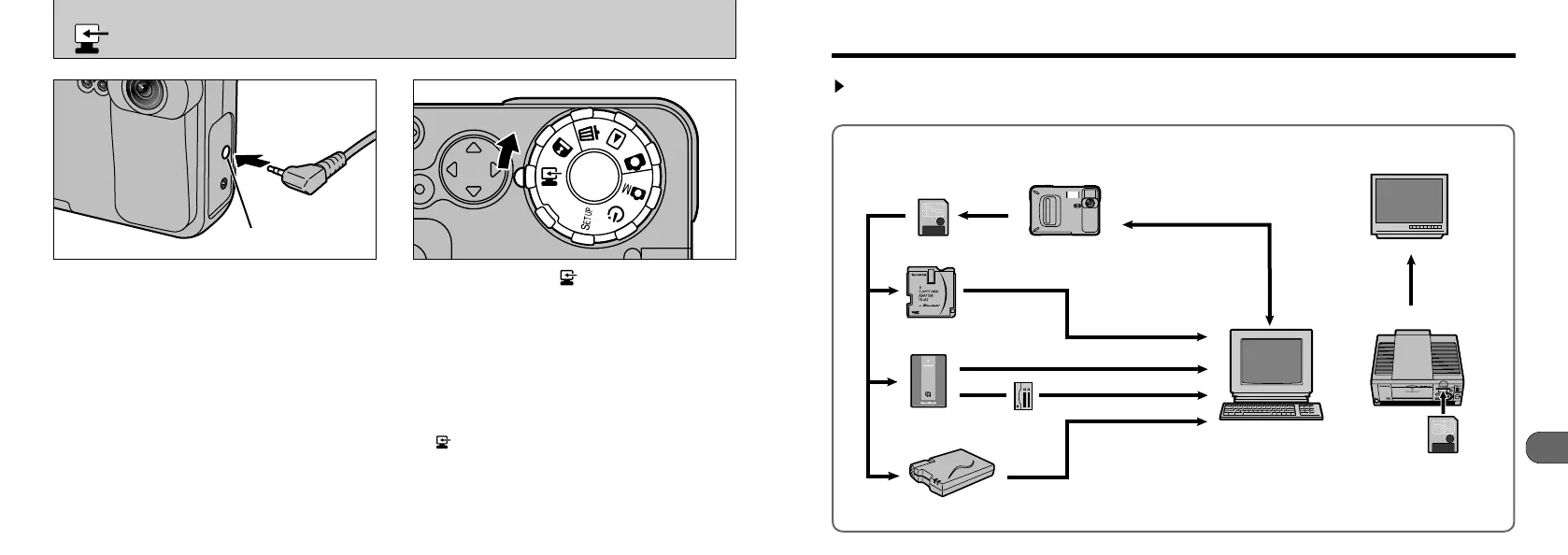
By using the MX-1200 together with other optional Fujifilm products, your system can be expanded
to fill a wide range of uses.
System Expansion Options
64
Always switch your camera and personal computer
off before you begin. Connect the mini-plug on the
special cable into the DIGITAL input/output socket
on your camera. Then plug the other end of the
cable into your personal computer.
The AC Power Adapter AC-5V (sold separately)
should be used when you are downloading images.
If the power fails during data transmission, the data
cannot be downloaded correctly.
●
Personal Computer Connection Port
Windows : Any of COM1 to COM4
✽ No USB port available.
PC MODE
(
DOWNLOADING IMAGES TO A PERSONAL COMPUTER
)
DIGITAL Socket
Set the mode dial to “”, switch the camera on
and then start up the personal computer. Then
use the software to download images.
●
!
Check that the special cable is properly connected
before switching the camera and personal computer
on.
●
!
The Auto Power Off function does not operate in
“” PC mode. (➡P.68)
●
!
Install the software before connecting the camera to
the personal computer. Do not use any cable other
than the special cable provided.
●
!
Refer to the Quick Start Guide for information on
installing the software.










 To Next Page