47
4
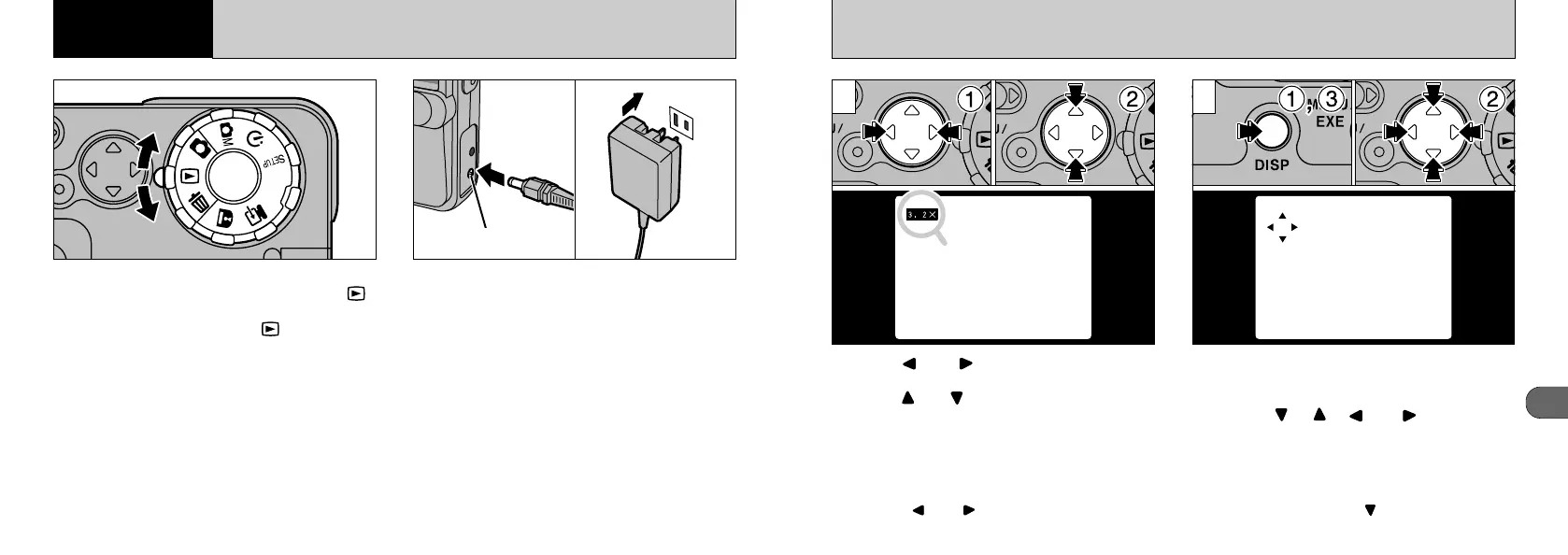
PLAYBACK ZOOM
➀
Press “” or “” on the 4-direction button
to display the image to be zoomed.
➁
Press “” or “” on the 4-direction button to
select the zoom scale.
After using the zoom...
➀
Press the “DISP” button.
➁
You can then move the area viewed by
pressing “”, “”, “” or “” on the 4-way
button (zoom shift).
➂
You can also change the zoom scale by
pressing the “DISP” button during zoom shift.
●
!
Zoom scales up to 4.0 ✕ can be set in 0.2 ✕
increments.
●
!
Pressing “” or “” during zooming cancels the
zoom and advances to the next image.
●
!
To cancel automatic playback, press the
“MENU/EXE” button or “” on the 4-way button
when an image is displayed.
1 2
46
ADVANCED PLAYBACK
This section explains the advanced functions that
are available when the Mode dial is set to “”.
All the explanations in this section assume that
the Mode dial is already set to “”.
If there is a power outlet nearby, use the AC-5V
AC Power Adapter (sold separately) to prevent
loss of power during image playback. (➡P.17)
4
Advanced
Features Playback
DC IN 5V socket










 To Next Page