33
3
4
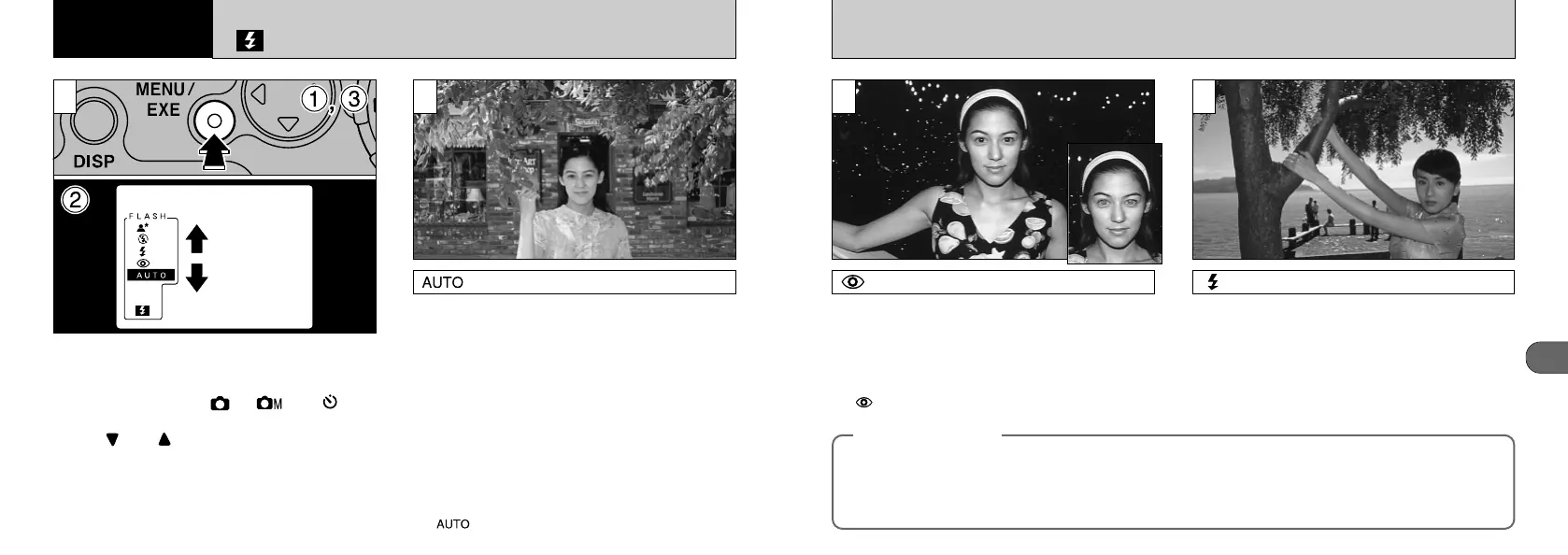
Forced Flash
Use this flash mode to photograph backlit
scenes, such as a subject against a window or
in the shade of a tree, or to obtain the correct
colors when you are shooting under lighting
such as fluorescent tubes. In this mode, the
flash fires in bright as well as dark conditions.
3
Red-Eye Reduction
Use this mode to ensure that the subject's eyes
appear natural when photographing people in low-
light conditions.
The flash fires a pre-flash just before the picture is
taken and then fires again to take the actual picture.
●
!
“
Red-Eye Reduction
” cannot be selected in Macro
mode.
◆
Red-Eye Effect
◆
When you use the flash to photograph people in low-light conditions, their eyes sometimes appear red in the picture. This
is caused by the light of the flash reflecting off the inside of the eye. Use Red-Eye Reduction flash mode to effectively
minimize the likelihood of the red-eye effect.
Take the following measures also to make Red-Eye Reduction mode more effective:
●
Get the subjects to look at the camera.
●
Get as close as possible to the subjects.
32
2
FLASH MODE
Use this mode for ordinary photography. The
flash fires automatically as required by the
conditions.
Auto flash mode
1
The MX-1200 provides a choice of 5 flash
modes to suit all conditions.
➀
If you press the “MENU/EXE
”
button when the
Mode dial is set to “”, “” or “”, the
menu appears.
➁
Use “” or “” on the 4-way button to select
the flash mode.
➂
Press the “MENU/EXE” button to apply the
mode selection.
●
!
“” cannot be selected in Macro mode.
3
Advanced
Features










 To Next Page