53
4
1 2
➀
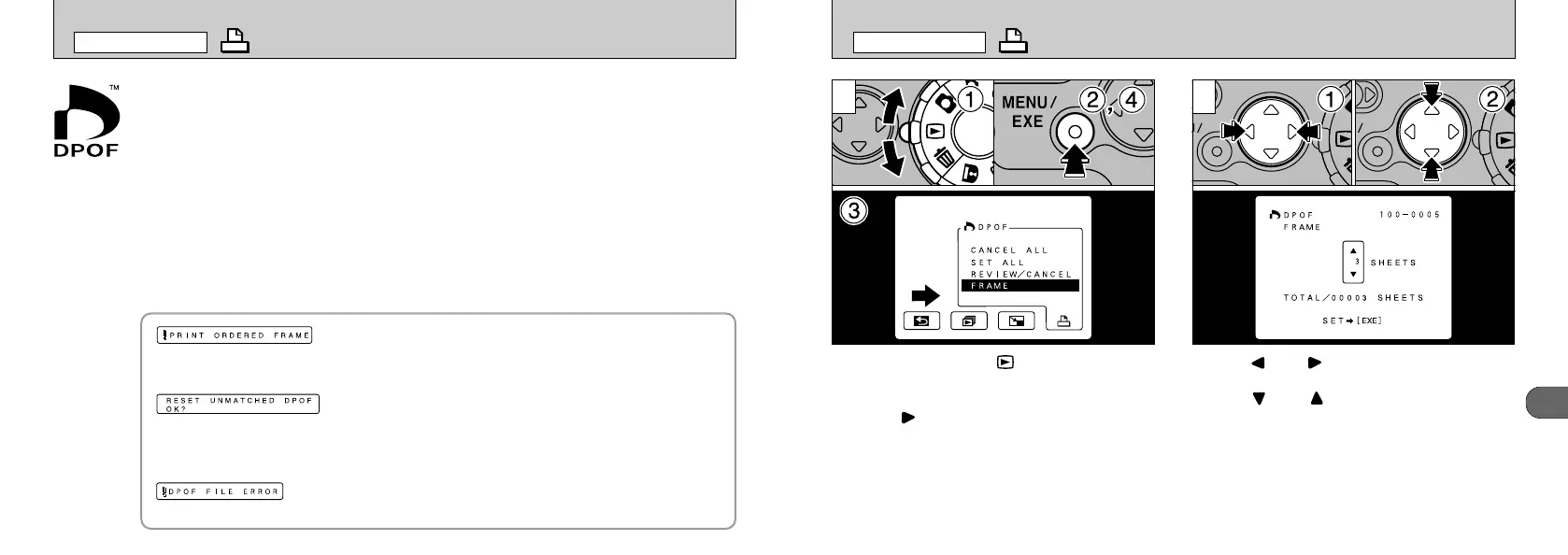
Set the Mode dial to “”.
➁
Press the “MENU/EXE” button to display the
menu on the LCD monitor.
➂
Press “” to select DPOF.
➃
Select “FRAME” and press the “MENU/EXE”
button.
➀
Use “” or “” to display the frame to be
specified.
➁
Use “
”
or “
”
to specify the number of
prints.
●
!
Up to 99 prints can be specified for one frame. The
maximum number of prints that can be specified for
frames on the same SmartMedia card is 999.
●
!
Multi-frame playback is an easy way to select
images to be printed
(
➡P.48
)
.
DPOF SET FRAME
PLAYBACK MENU
52
HOW TO SPECIFY PRINT OPTIONS
With the MX-1200, you can order prints using the Digital Print Order Format (DPOF).
You can use the DPOF to specify the following:
●
The frames to be printed and the number of prints for each frame
●
Imprinting of the date and time
This section gives a detailed description of how to order your prints with the MX-1200.
✽ Note that some printers do not support date and time imprinting or specification of the
number of prints.
✽ Note that the warnings shown below may be displayed while you are specifying the
prints.
(
➡P.75
)
Frames specified for printing are automatically protected. To remove protection from
those frames, you must cancel the print specification.
(
➡P.75
)
If you load a SmartMedia that contains frames specified for printing on another
camera, those print specifications are all reset and replaced by the new print
specifications.
(
➡P.75
)
No more than 999 prints can be specified on the same SmartMedia.
PLAYBACK MENU










 To Next Page