37
3
MANUAL MODE
21
Set the Mode dial to “”. The settings menu
is displayed.
●
!
When you want to view the image on the LCD
monitor, press the “DISP” button.
Use “” and “” on the 4-direction cursor to
move around the menu and “” and “” to
select a setting.
◆
Factory Default Settings
Menu
Forced Flash
White Balance
Brightness(EV)
0
AUTO
AUTO
Setting
See P.32-34 for more information on the
flash modes.
36
● If the digital telephoto is used when FILE SIZE
(number of pixels) is set to [1280 ✕ 960], the
image is recorded at 640 ✕ 480 pixels.
(➡P.43)
● If FILE SIZE (number of pixels) is set to
[640 ✕ 480], the number of pixels recorded
(the image size) does not change when the
digital zoom is used.
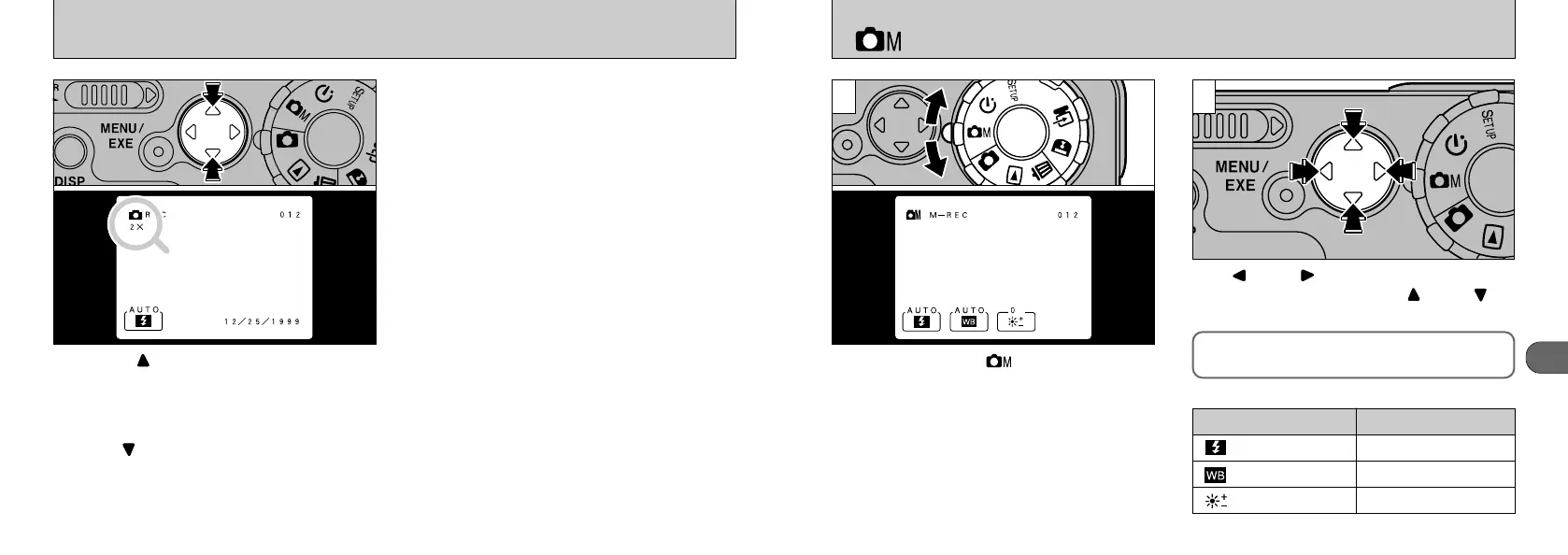
Pressing “” on the 4-way button during
photography (in any photography mode) allows
you to zoom in on your subject, roughly doubling
(2✕) the size of the central part of the image.
The zoom scale is shown on the LCD monitor.
Pressing “” restores the normal image.
USING THE DIGITAL TELEPHOTO
●
!
This function does not operate with the LCD monitor
switched off.
●
!
Use the LCD monitor to take pictures.
✽ The above settings are the same as those used in Auto mode.










 To Next Page