61
5
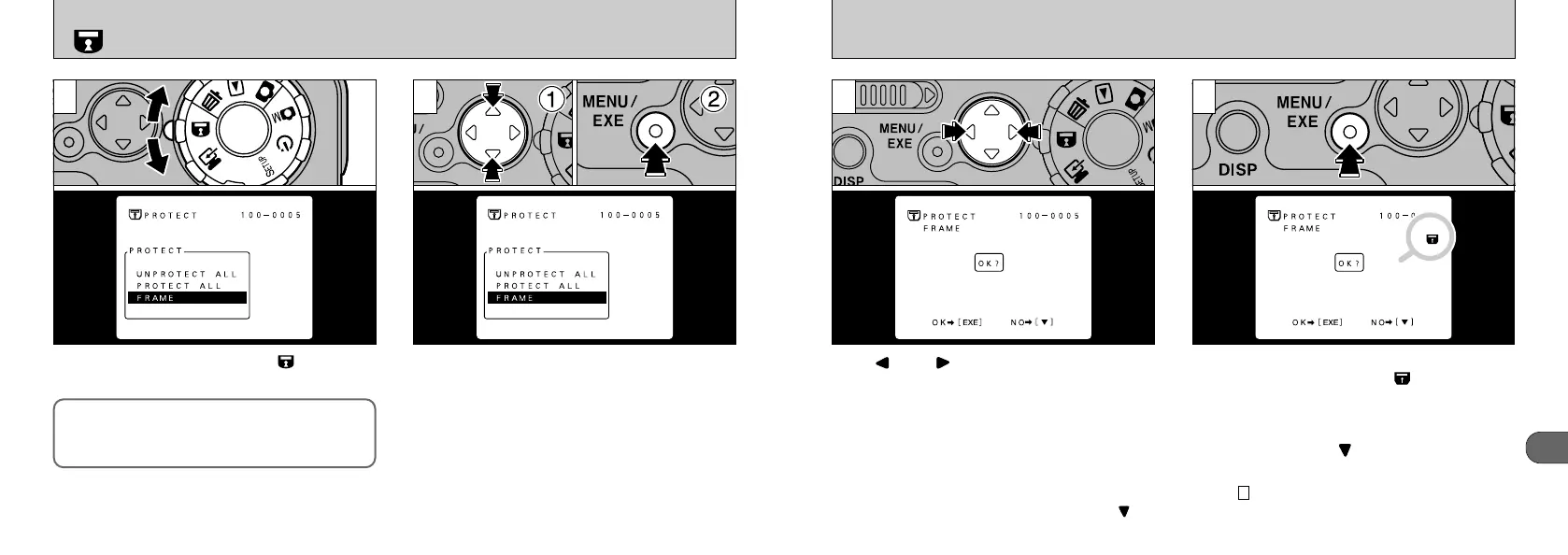
Use “” or “” to select the image to be
protected.
When the “MENU/EXE” button is pressed, the
image is protected and the “” icon appears
on the right of the screen. To remove the
protection, press the “MENU/EXE” button again.
To finish setting and removing single-frame
protection, press the “” button.
●
!
Multi-frame playback is an easy way to select
images (➡P.48).
●
!
If you do not want to protect the frame, press “” on
the 4-way button.
●
!
To protect another image, repeat the procedure from
step .
●
!
Formatting erases all images, including protected
images. (➡P.58)
3
43
60
When you set the Mode dial to “”, the menu
appears on the LCD monitor.
Protection:
A setting that prevents images from being
inadvertently erased.
➀
Select “FRAME”.
➁
Press “MENU/EXE.
SETTING AND REMOVING SINGLE-FRAME PROTECTION
1 2
●
!
The protection cannot be cancelled for files specified
in the DPOF settings. Cancel the DPOF setting first.
(➡P.56)











 To Next Page