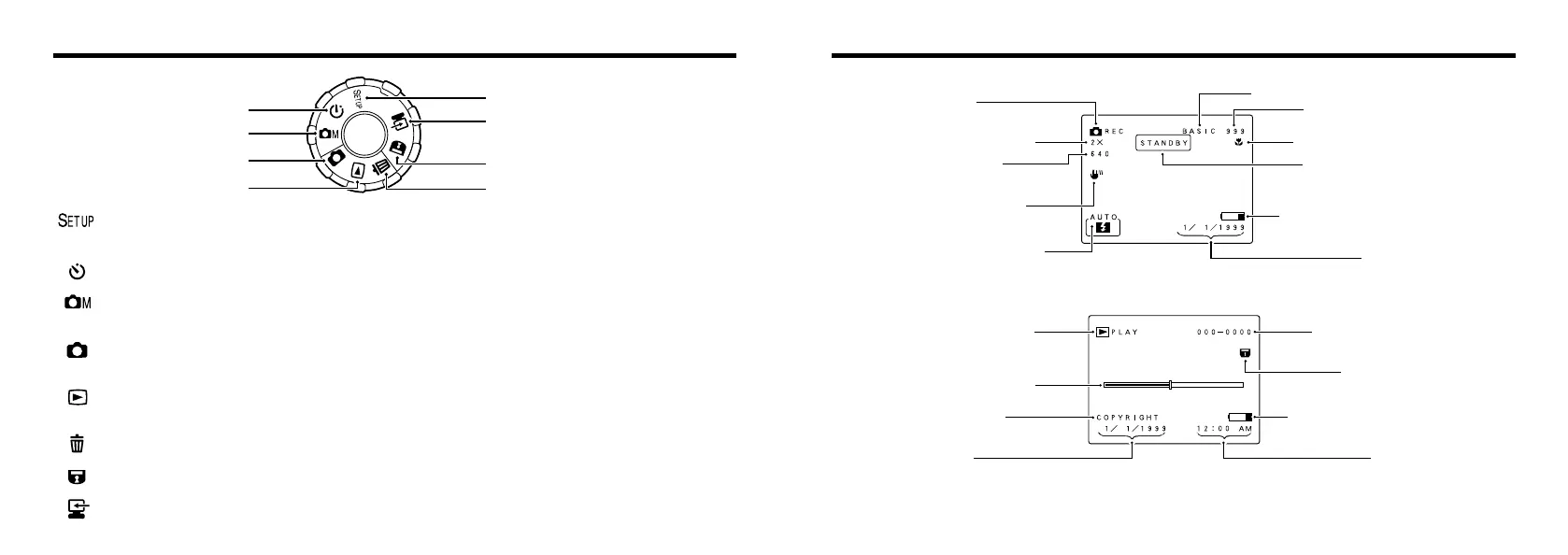
: Setup mode (➡P.43)
Use this mode to specify the QUALITY (image quality), FILE SIZE (number of pixels), SHARPNESS, FRAME NO. (frame
number memory), BEEP (buzzer volume), DATE/TIME and RESET settings.
: Self-Timer mode (➡P.41)
This mode allows you to take pictures using a 10-second timer.
: Manual mode (➡P.37)
Manual mode allows you to check the photographed image before it is recorded. This mode also allows you to set the flash
mode, white balance and brightness (exposure).
: Auto mode (➡P.22)
This is a simple and convenient photography mode in which the camera automatically controls settings such as the
exposure to suit the shooting conditions.
: Playback mode (➡P.28, 46)
In addition to normal single-frame playback, Playback mode allows playback zoom and multi-frame playback. You can also
use Playback mode to specify the settings for automatic playback, resizing and the DPOF function.
: Erase mode (➡P.29, 58)
In Erase mode, you can erase single frames, erase all the frames on a SmartMedia, or format (initialize) the SmartMedia.
: Protect mode (➡P.60)
Protect mode allows you to protect or remove the protection from one frame or all the frames on a SmartMedia.
: PC mode (➡P.64)
In PC mode, you can use the enclosed software to download your images to a personal computer.
Mode dial
✽ The “COPYRIGHT” field is a feature of the software provided with the Interface Set (included), and appears when
copyright information was entered on the camera that was used to shoot the displayed image. Refer to the
instructions supplied with the software for details.










 To Next Page