92
5
Taking Photographs
Continuous Shooting (Burst Mode)
Capture motion in a series of pictures.
1
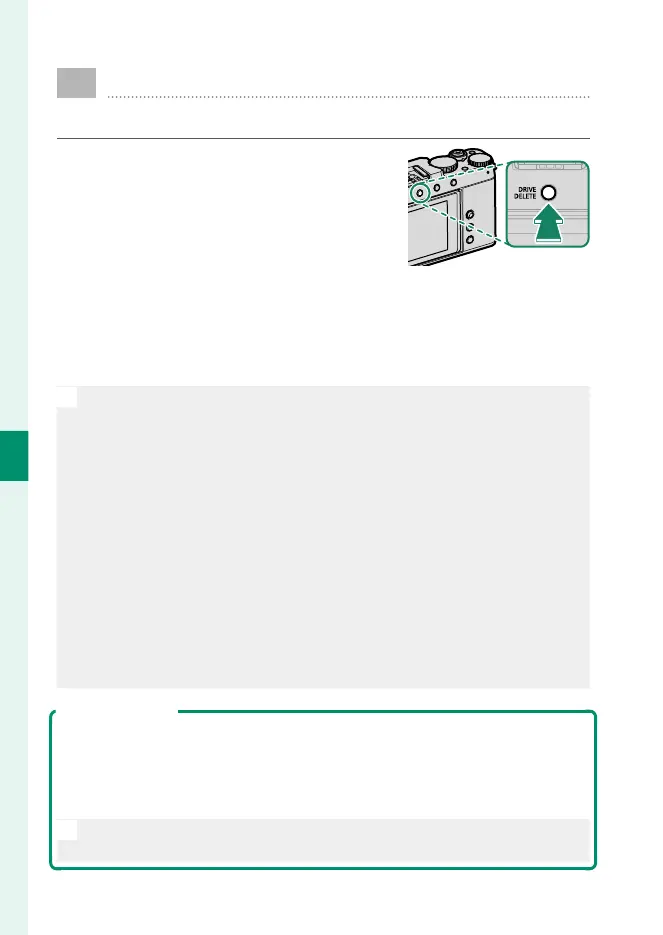
Press the DRIVE/DELETE button and
select CH HIGH SPEED BURST or
CL LOW SPEED BURST in the drive-
mode menu.
2
Choose the frame advance rate and press the shutter button
to start shooting.
Shooting ends when the shutter button is released or the
memory card is full.
O
•
Frame advance rates of 10 fps or faster are available only when
s ELECTRONIC SHUTTER is selected for A SHOOTING SETTING>
SHUTTER TYPE.
•
If le numbering reaches 9999 before shooting is complete, the re-
maining pictures will be recorded to a new folder.
•
Shooting ends when the memory card is full; the camera will record
all photos shot to that point. Burst shooting may not begin if the
space available on the memory card is insu cient.
•
Frame rates may slow as more shots are taken.
•
Frame rate varies with the scene, shutter speed, sensitivity, and focus
mode.
•
Depending on shooting conditions, frame rates may slow or the ash
may not re.
•
Recording times may increase during burst shooting.
Focus and Exposure
•
To vary focus with each shot, select CONTINUOUS AF for G AF/MF
SETTING> FOCUS MODE.
•
To vary exposure with each shot, select OFF for D BUTTON/DIAL
SETTING> SHUTTER AE.
N
Depending on such factors as aperture, sensitivity, and exposure com-
pensation, exposure may not be adjusted automatically.


 To Next Page