292
Connections
11
Connecting to Smartphones
To copy pictures to a smartphone, select OFF for D CONNECTION
SETTING> USB POWER SUPPLY SETTING and connect the cam-
era to the phone using a USB cable.
For Customers Using Android Devices
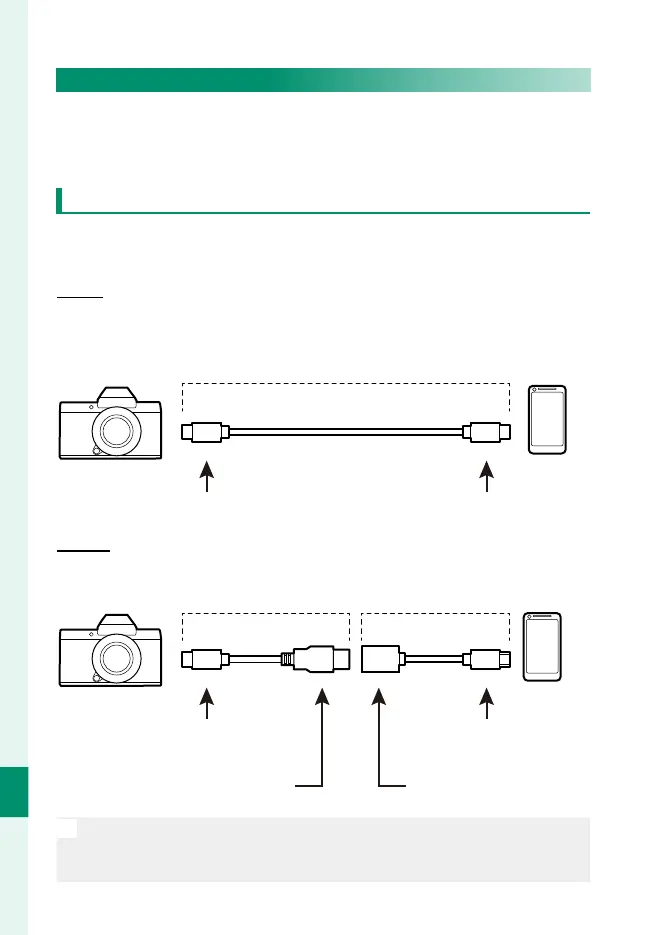
How you will connect the camera depends on the type of USB
connector with which your smartphone is equipped.
Type-C
Ready a cable equipped with connectors matching the USB
(Type-C) connector on the camera.
Third-party USB cable
Type-C connector (male) Type-C connector (male)
Micro-B
Use a USB on-the-go (OTG) cable.
Supplied USB cable USB OTG cable
Type-C connector (male) Micro-B connector (male)
Type-A connector (male)
Type-A connector (female)
O
•
The smartphone must support USB OTG.
•
The desired results cannot be achieved with a USB Type-C–to–
Mirco-B cable. Use an OTG cable.



 To Next Page