30
2
First Steps
Inserting the Battery and a Memory Card
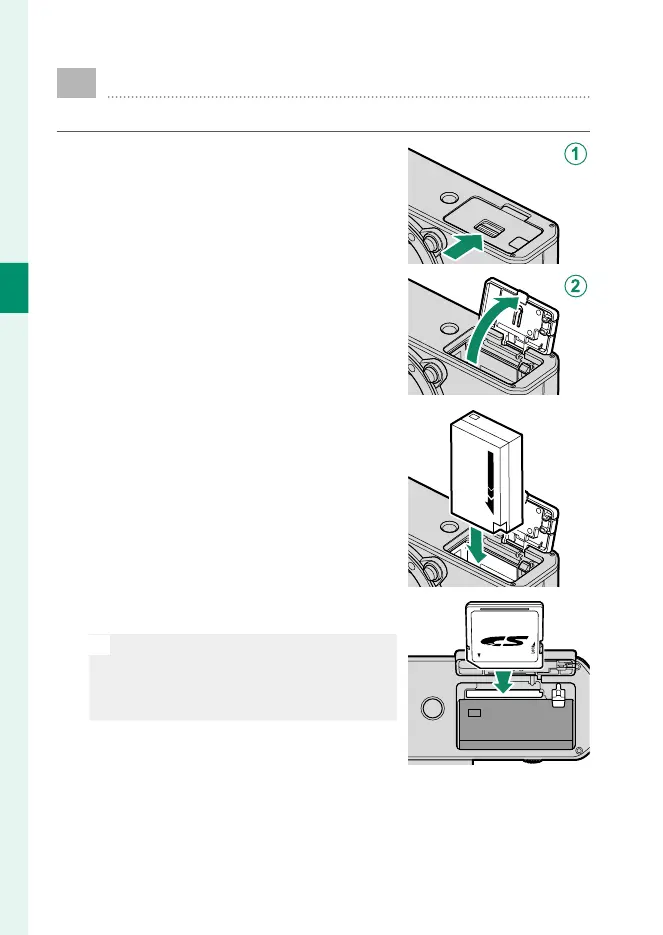
Insert the battery and memory card as described below.
1
Slide the battery-chamber cover latch
as shown and open the battery-cham-
ber cover.
2
Insert the battery.
Using the battery to keep the bat-
tery latch pressed to one side, in-
sert the battery contacts rst in the
direction shown by the arrow.
3
Insert the memory card.
N
The optional SD, SDHC, and SDXC
memory cards the camera uses to store
pictures are referred to as “memory
cards”.
4
Close the battery-chamber cover and slide the battery-cham-
ber cover latch closed.



 To Next Page