20
1
Before You Begin
Using the Menus
Selecting a Menu Tab
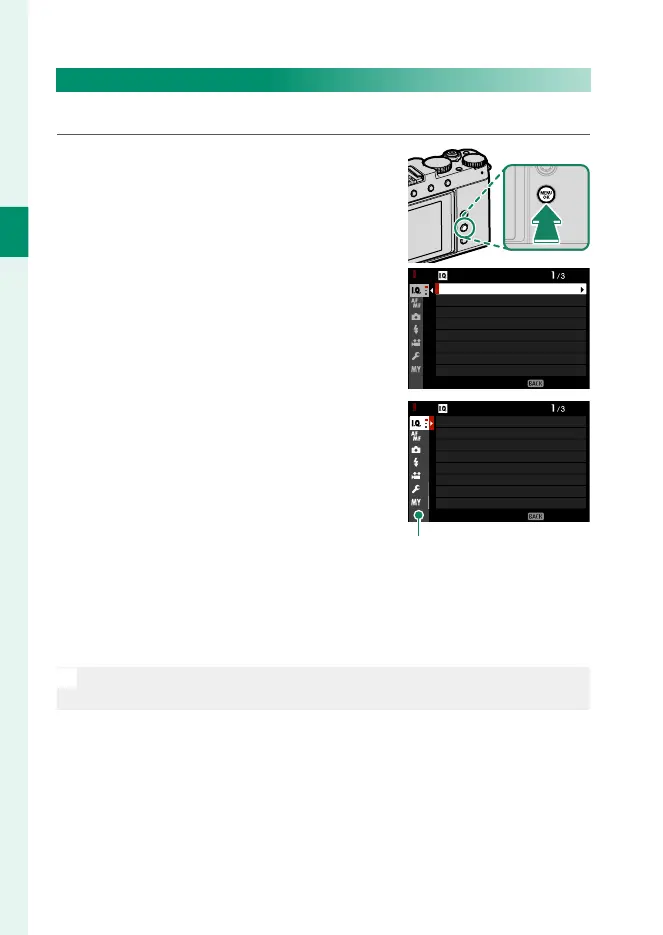
To navigate the menus:
1
Press MENU/OK to display the menus.
EXIT
IMAGE QUALITY SETTING
IMAGE SIZE
IMAGE QUALITY
RAW RECORDING
FILM SIMULATION
GRAIN EFFECT
COLOR CHROME EFFECT
COLOR CHROME FX BLUE
MONOCHROMATIC COLOR
2
Press the focus stick (focus lever)
left to highlight the tab for the cur-
rent menu.
EXIT
IMAGE QUALITY SETTING
IMAGE SIZE
IMAGE QUALITY
RAW RECORDING
FILM SIMULATION
GRAIN EFFECT
COLOR CHROME EFFECT
COLOR CHROME FX BLUE
MONOCHROMATIC COLOR
Tab
3
Press the focus stick up or down to highlight the tab contain-
ing the desired item.
4
Press the focus stick right to place the cursor in the menu.
N
The front command dial can be used to highlight items when menus
are displayed.



 To Next Page