121
6
The Shooting Menus
IMAGE QUALITY SETTING (Still Photography)
Deleting Custom Settings
Delete settings from selected custom settings banks.
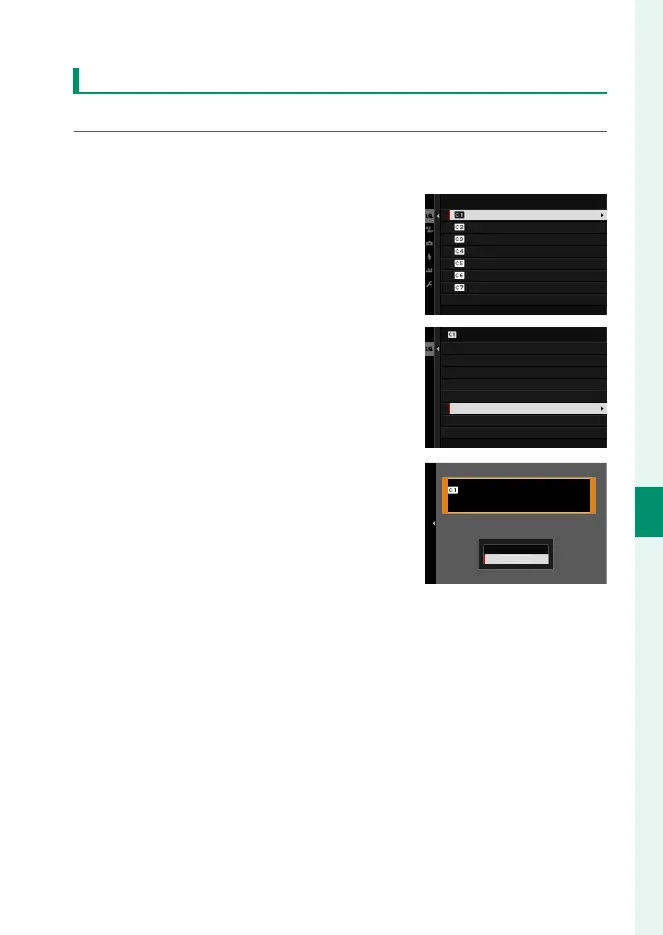
1
Select H IMAGE QUALITY SETTING> EDIT/SAVE CUSTOM
SETTING in the shooting menu and press MENU/OK.
2
Highlight the desired custom set-
tings bank and press MENU/OK.
CUSTOM 2
CUSTOM 3
CREATE NEW
CUSTOM 4
CREATE NEW
EDIT/SAVE CUSTOM SETTING
CREATE NEW
CUSTOM 1
3
Highlight ERASE and press MENU/OK.
A con rmation dialog will be dis-
played.
SAVE THE CHANGES
RESET THE CHANGES
EDIT CUSTOM NAME
EDIT/CHECK
COPY
ERASE
CUSTOM 1
4
Highlight OK and press MENU/OK.
Any custom settings saved to the se-
lected bank will be deleted.
OK
AN
E
CUSTOM 1
ERASE OK?
ERASE



 To Next Page