System upgrades
40 A26361-K990-Z120-1-7619, Edition 6
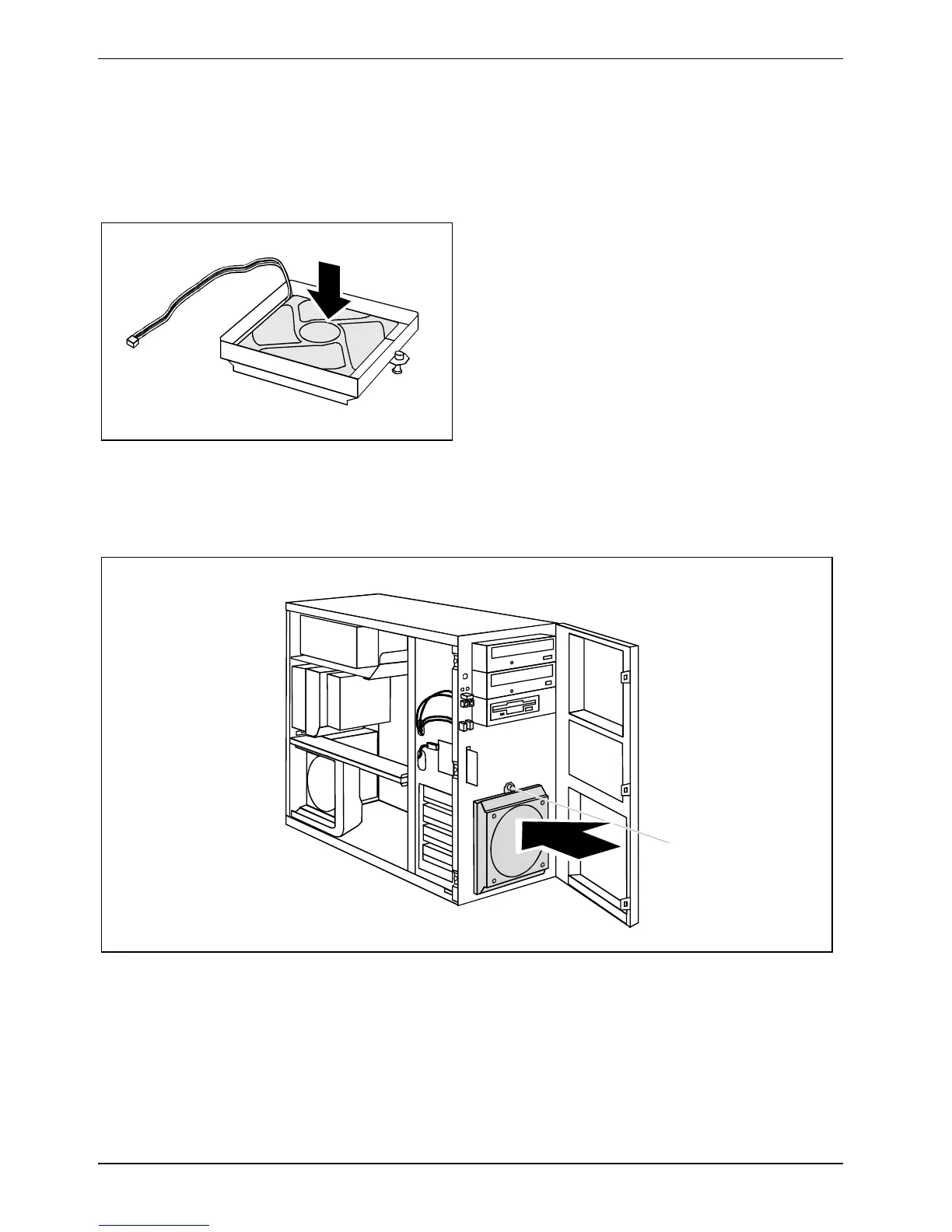
Installing front fan (CELSIUS M)
You must install a front fan when converting the hard disks to SCSI hard disks.
Securing front fan on fan bracket
1
► Lay the fan on the fan bracket in the
direction of the arrow (1).
When doing so, ensure the proper rotating and
air-flow direction.
► Press the fan firmly into the fan bracket until
it is felt to engage.
Installing the front fan
► Open the casing (see "
Opening the casing").
► Open the front panel (see "
Opening front panel").
1
2
► Connect the fan cable.
► Insert the fan into the casing in the direction of the arrow (1) so that the lower edge of the fan is
flush with the bottom of the device.
Make sure that the power supply cable is not pinched when doing so.
► Slightly pull back the green expansion rivet (2) until the tip of the expansion rivet is no longer
spread.



 To Next Page