System upgrades
54 A26361-K990-Z120-1-7619, Edition 6
Installing and removing a board
!
Please take note of the section "
Information about boards".
The number, position and arrangement of the board slots on the mainboard can be found in the
manual for the mainboard. Boards may already be installed on shipment.
Installing a board
► Open the casing (see "Opening the casing").
► Remove the fan (see "
Removing the side fan").
► Remove the cross-piece if it is in the way (see "
Removing the cross-piece”).
3
2
1
1
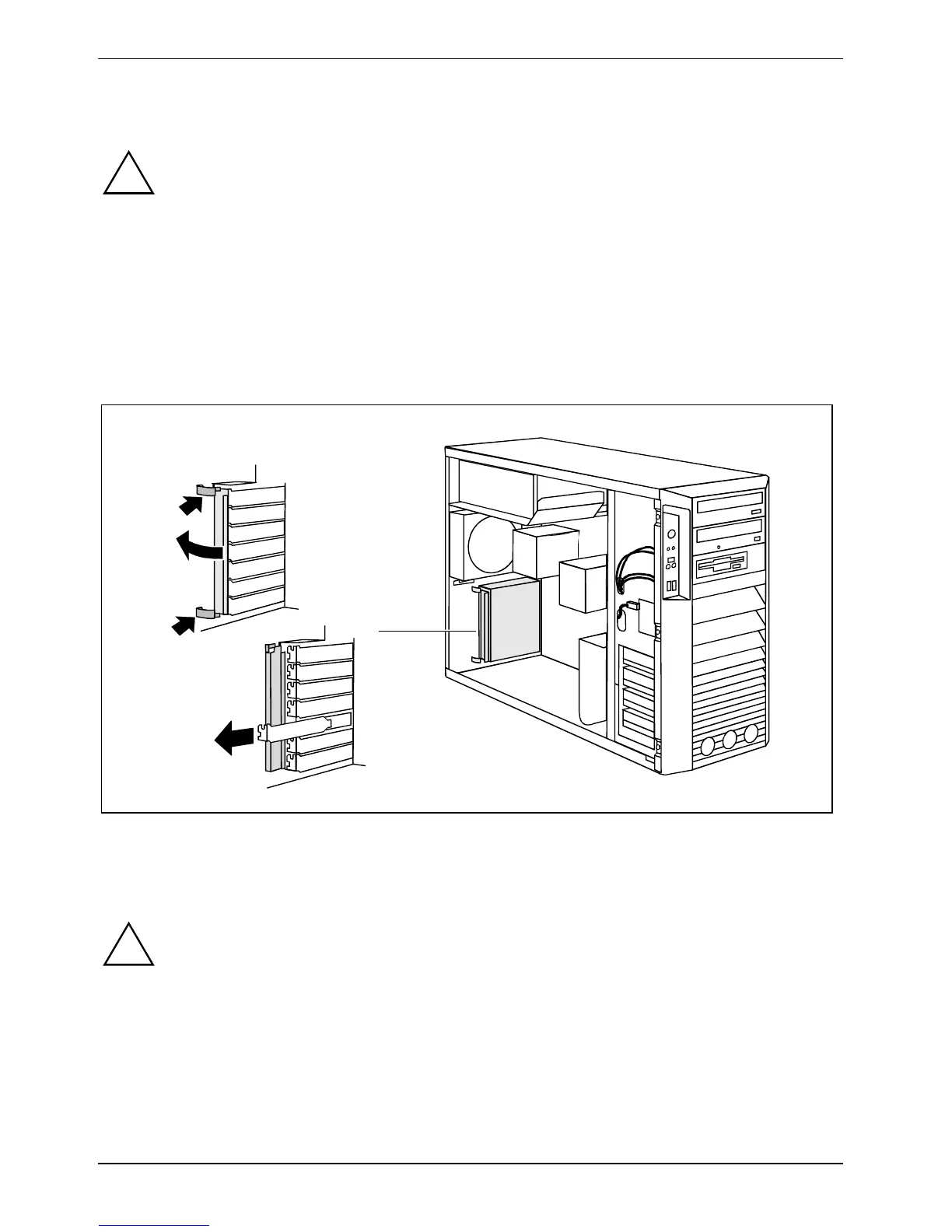
► Press on the clips (1) in the direction of the arrow and unhook them from the casing rear panel.
► Fold open the locking rail in the direction of the arrow (2).
► Remove the slot cover from the slot (3).
!
Do not dispose of the slot cover. For cooling, protection against fire and in order to comply
with EMC regulations, you must refit the slot cover if you remove the board.
► Take the new board out of its packaging.
► Make the required settings for the board.



 To Next Page