19
For Windows Me and Windows 98 Users
OS Built-in Formatter
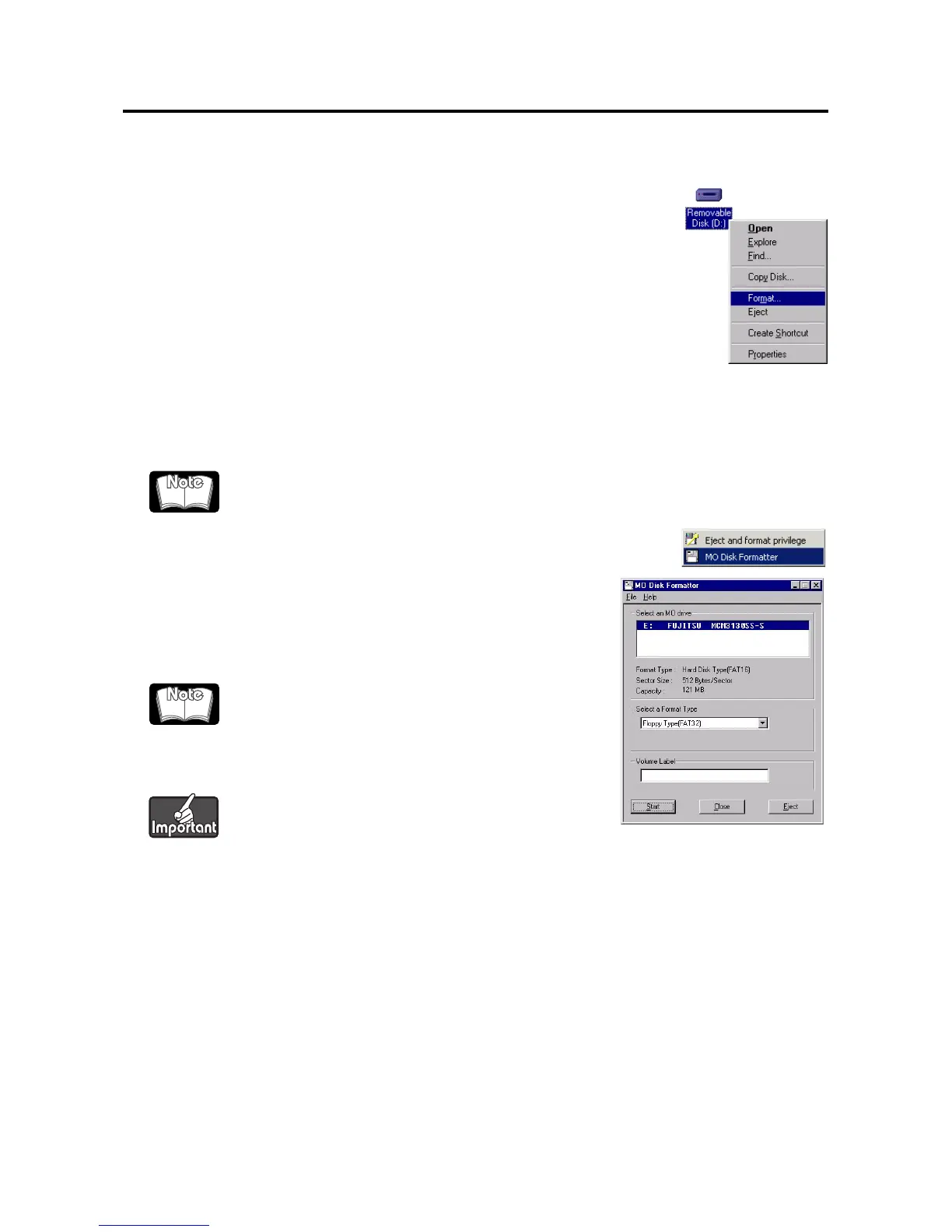
1. From Explorer, open My Computer.
2. Right-click the Removable Disk icon corresponding to the MO
drive and select [Format...].
3. Set the required items in the dialog box, and click the [Start]
button.
FUJITSU MO Disk Formatter
1. Insert the MO disk then run the MO Disk Formatter.
The dialog box will appear.
2. Select the MCR3230SS-S (DynaMO 2300 SCSI) or
MCM3130SS-S (DynaMO 1300 SCSI) in the [Select an MO
drive] list box.
3. Select [Floppy Type (FAT32)] in the [Select a Format Type]
combo box.
4. Type an appropriate volume label in the [Volume Label]
edit box.
5. Press the [Start] button to continue formatting. Confirm the message and click the [OK]
button. Formatting will start.
All menus and messages for this software are presented in English.
FAT32 formatted MO disks cannot be used in Windows
NT4.0.
Use only English alphabet (A-Z) and/or numeric number
(0-9) and/or underscore (_).










 To Next Page