fi-5120C / fi-5220C Image Scanner Operator
Guide
TROUBLE SHOOTING
CONTENTS MAP
TOP
5.2 Replacing the Pad Assy (2)
1
2
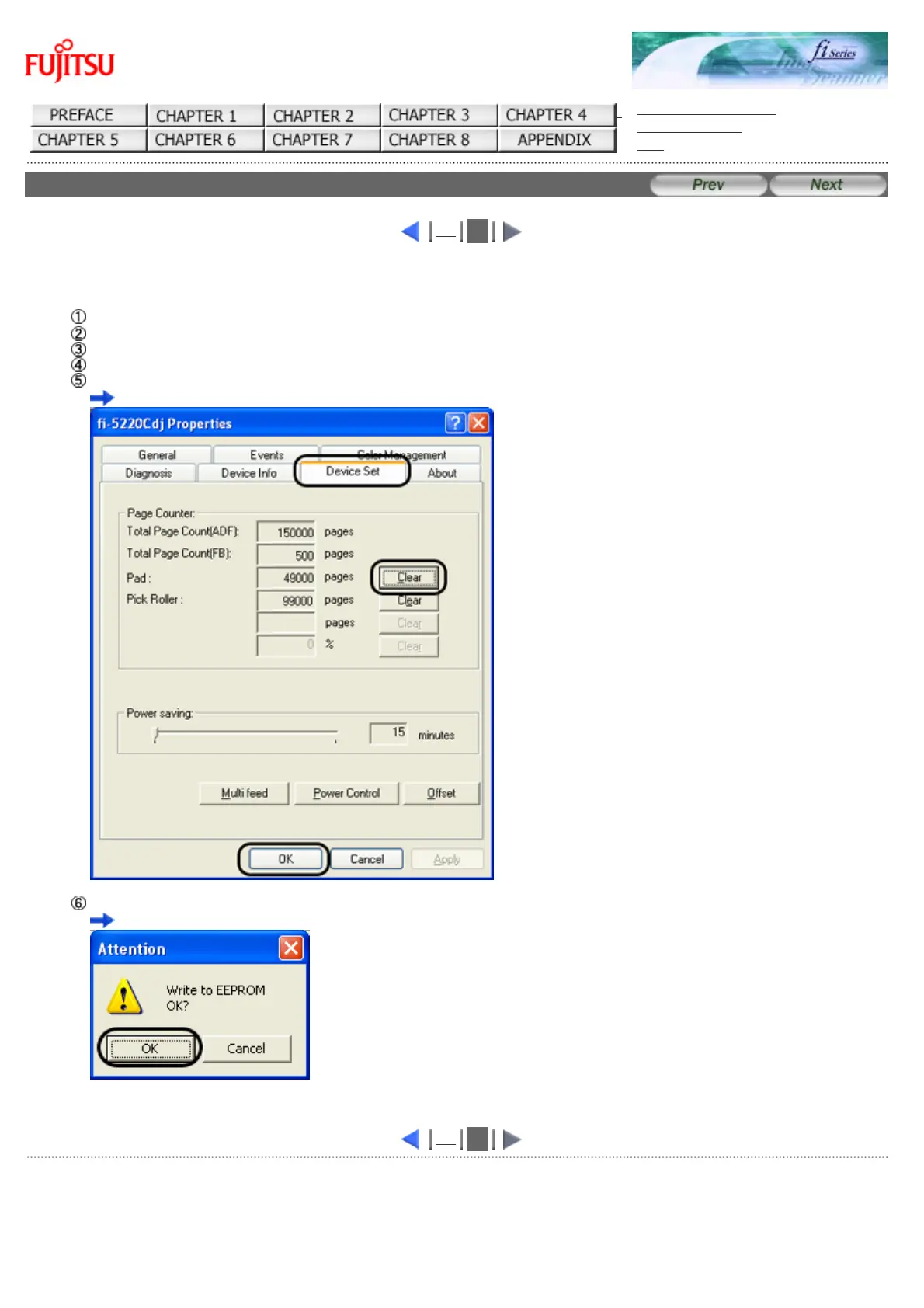
6. Reset the Pad Counter.
When turning on the power, check that the scanner is connected to your PC.
Open the [Scanners and Cameras] from the [Control Panel] of your PC.
Open the properties dialogbox of fi-5120Cdj or fi-5220Cdj from the [Scanners and Cameras].
The properties dialogbox of fi-5120C or fi-5220C appears.
Click the "Device Set" tab.
The following screen is displayed.
After clicking the [Clear] button beside "Pad" in "Page Counter", click the [OK] button.
The following screen is displayed.
Click the [OK] button. The Pad counter returns to "0".
1
2
All Rights Reserved Copyright 2006-2009 © PFU LIMITED



 To Next Page
 Loading...






