fi-5120C / fi-5220C Image Scanner Operator
Guide
TROUBLE SHOOTING
CONTENTS MAP
TOP
2.5 How to Use the Scanner Driver (1)
1
2 3 4 5 6 7 8 9 10 11 12 13 14 15
FUJITSU TWAIN32 Scanner Driver
FUJITSU TWAIN32 Scanner Driver is designed for scanning documents with FUJITSU image scanner fi series by using
application software that complies with the TWAIN standard.
The following describes the procedure with examples of ScandAll 21 for ordinary scanning by using this driver software.
1. Procedure for Basic Scanning Operation
Startup the application.
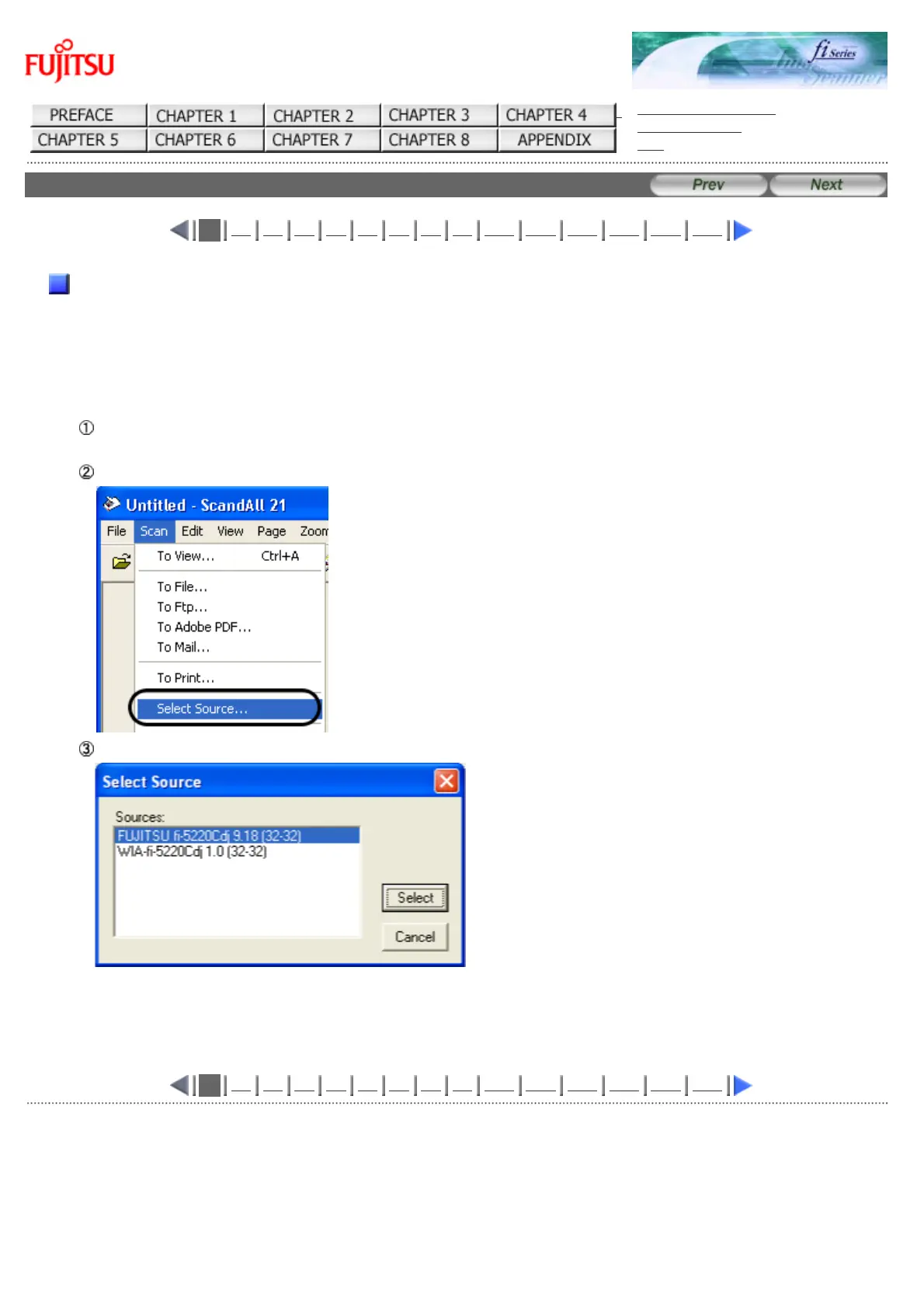
From the [Start] menu, select [Programs]-[Scanner Utility for Microsoft Window] and click [ScandAll 21].
Select your scanner on the window below. Select [Select Source] from the [Scan] menu.
Select the scanner to use, then click the [Select] button.
Select
● "FUJITSU fi-5120C" or "FUJITSU fi-5220C"
1
2 3 4 5 6 7 8 9 10 11 12 13 14 15
All Rights Reserved Copyright 2006-2009 © PFU LIMITED










 To Next Page