Network Scanner fi-6000NS Getting Started 11
Chapter 5 Performing a Scan Test
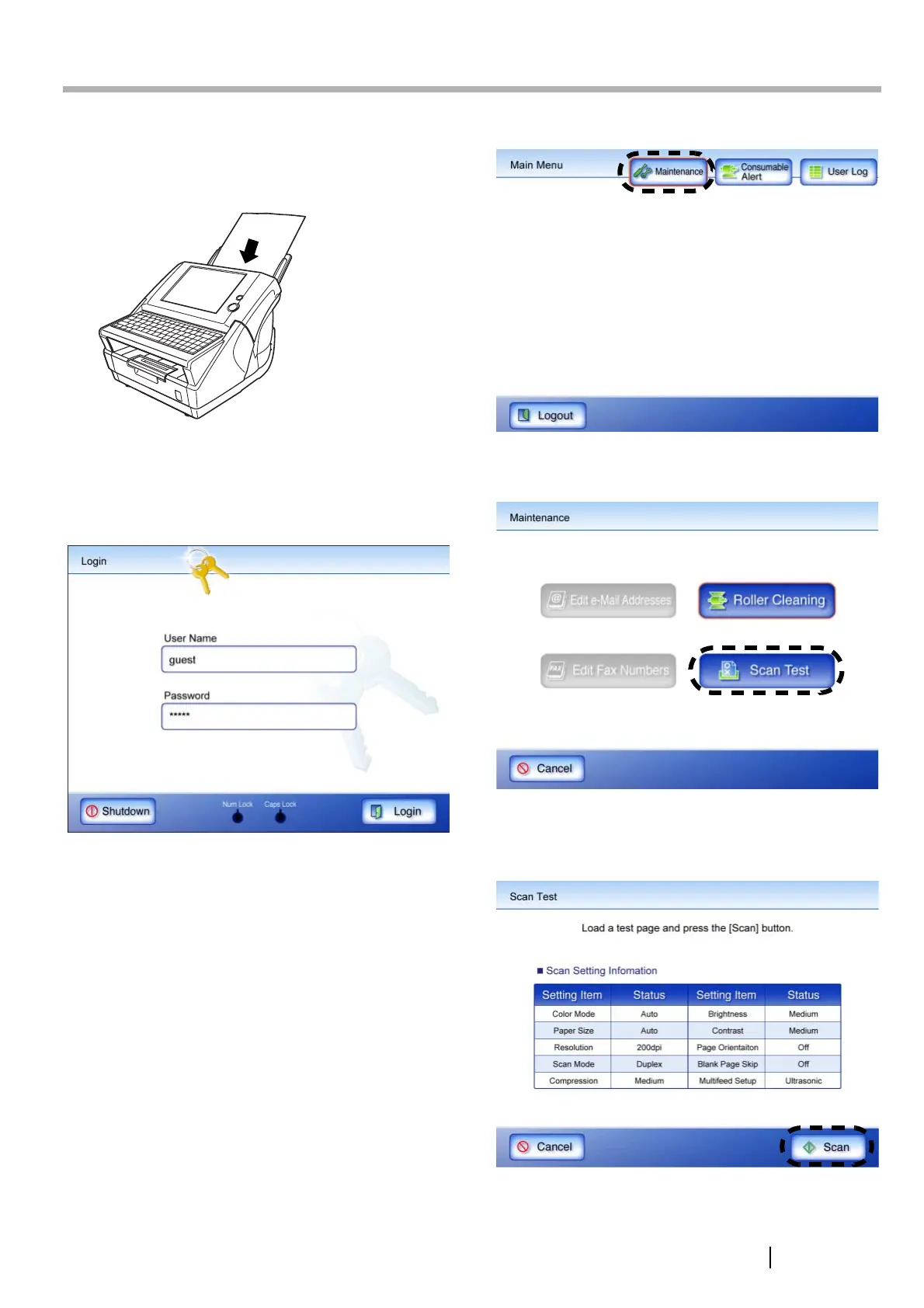
Perform a scan test to determine if the scanner is
working properly. Login as a regular user to perform the
scan test.
1. Load the documents to be test scanned.
⇒ The "Login" screen appears.
2. On the "Login" screen, enter a "User Name"
and "Password".
Enter "guest" for both fields here.
3. Press the [Login] button.
⇒ If the user name and password are valid, the
"Main Menu" screen appears.
4. Select the [Maintenance] button on the "Main
Menu" screen.
⇒ The "Maintenance" screen appears.
5. Press the [Scan Test] button.
⇒ The scan settings information for the scan test
is displayed.
6. Press the [Scan] button.
⇒ Scanning starts. When the scan has
completed, the "Scan Viewer" opens.
Reverse
Side



 To Next Page
 Loading...









