Working with the Tablet PC
SIM card
A SIM card (Subscriber Identity Module) is a c hip card which is inserted in a m obile telephone or
Tablet PC and, together with an integrated UMTS/LT E module, enab les access to a m obile network.
Please follow the instructions supplied by th e provider when hand ling
the SIM card. If y ou do not feel the SIM card engage as you insert it,
use a pointed object to insert the SIM card.
Please note t hat the SIM card format must be micro-SIM (3FF). Other SIM
card formats, such as full-size (1FF), mini-SIM (2FF) or nano-SIM (4FF)
do not fit in the SIM card slot of your tablet PC.
Please do not insert any other format of SIM card as they could
twist or even damage the system.
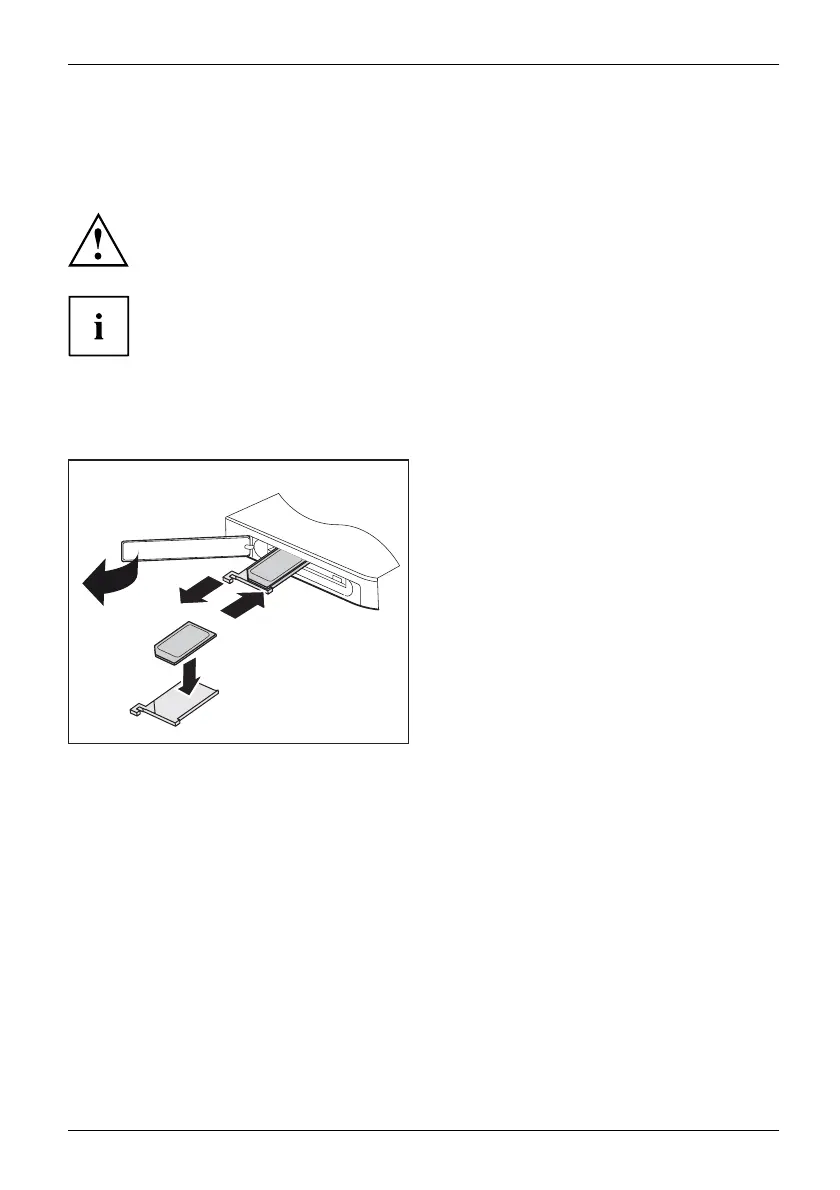
Inserting the SIM card
1
2
4
3
► O pen the slot cover
(1).
► Pull t he SIM card holder out of the slot (2).
► Ins e rt th e SIM car
d(3)intheSIM
card holder as sh
own.
► Push the SIM card holder back
into the slot (4).
► Close the slot
cover.
Fujitsu 33















 To Next Page