Working with the Tablet PC
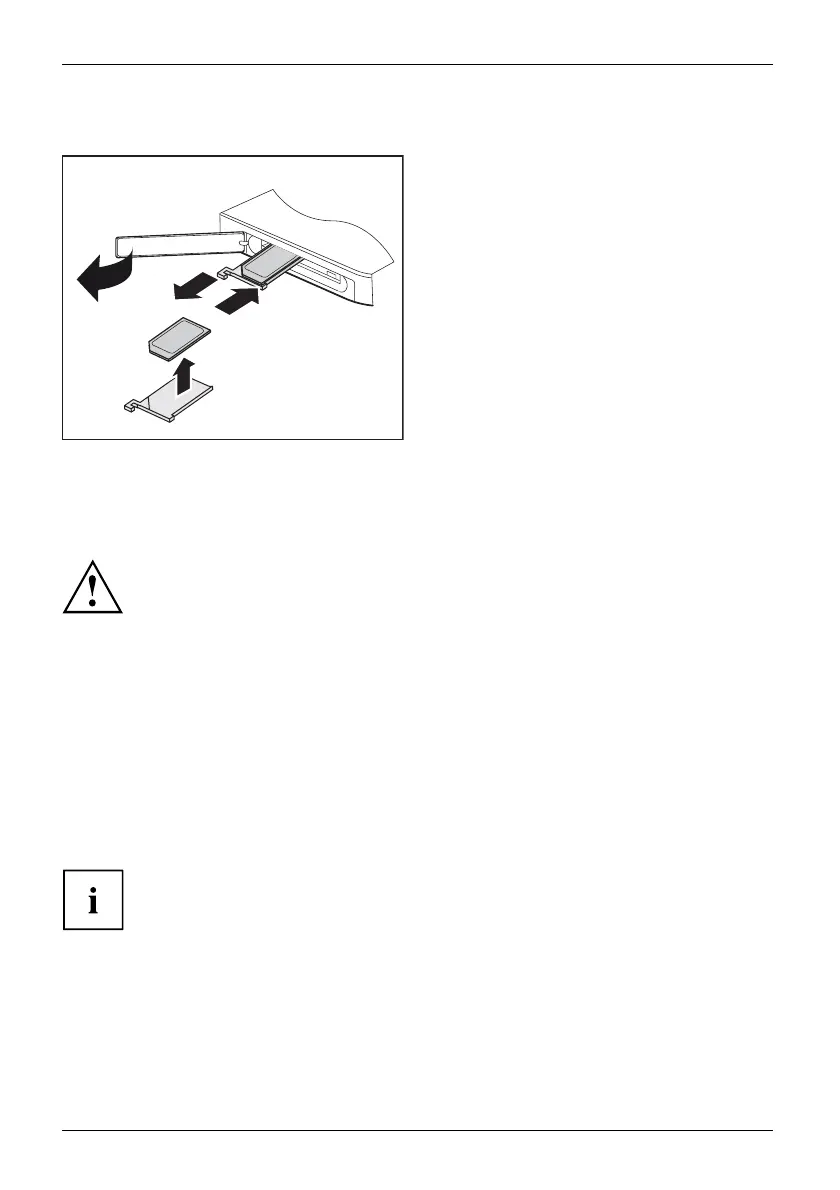
Removing the SIM card
1
2
4
3
► Open the slot cover (1).
► Pull the SIM card holder out of the slot (2).
► Remove the SIM ca rd from the SIM
card holder (3).
► Push the SIM card holder back
into the slot (4).
► Close the slot cover.
Wireless LAN / Bluetooth / UMTS / LTE / NFC wireless
components (depe
nding on configuration)
The installation of wireless components not approved by Fujitsu will
invalidate the certifications issued for this device.
Switching the wireless components on and off
wireless compo nents are switched on and off via the corresponding functions of the operating system.
► To switch wireless components on and off individually, select Settings – Change
PC settings – Network – Airplane mode.
Setting up WLAN access
• Requirement: A WLAN must be available and you m u st have the
corresponding access information.
Information on configuring the WLAN access can be found in the
documentation for your operating system.
NFC (Near Field Communication, depending on configuration)
Depending on the configuration chosen, your Tablet PC may be eq uipped with an
integrated NFC chip. Near field communication is used for contact-free data exchange by
wireless transmission over short dista nce s (a few centimetres).
34 Fujitsu















 To Next Page