Working with the Tablet PC
Using fingers
You can exe cute certain commands by using your finger tip on the touchscreen of your device.
Everything which you can select or activate using your finger tip can
also be selected or activated using the pen.
Calibrate the Dual Digitizer for finger-based
operation of the device
Via the operating system, you must calibrate your tablet PC before first use with
your fingers, so that it detects your finger tips as accurately as possible.
As soon as you ascertain that the accuracy is d eteriorating, you
must recalibrate the device.
Please note: There are separate calibration programs available for calibrating
the pen and for calibrating finger-based operation. Do not use the calibration
tool for the pen to calibrate finger-based operation.
Operating system Menu
Windows 10
To calibrate, call up the Hardware and Sound / Tablet PC Settings function
in the Control Panel. You ne ed to calibrate both portrait and landscape
formats.
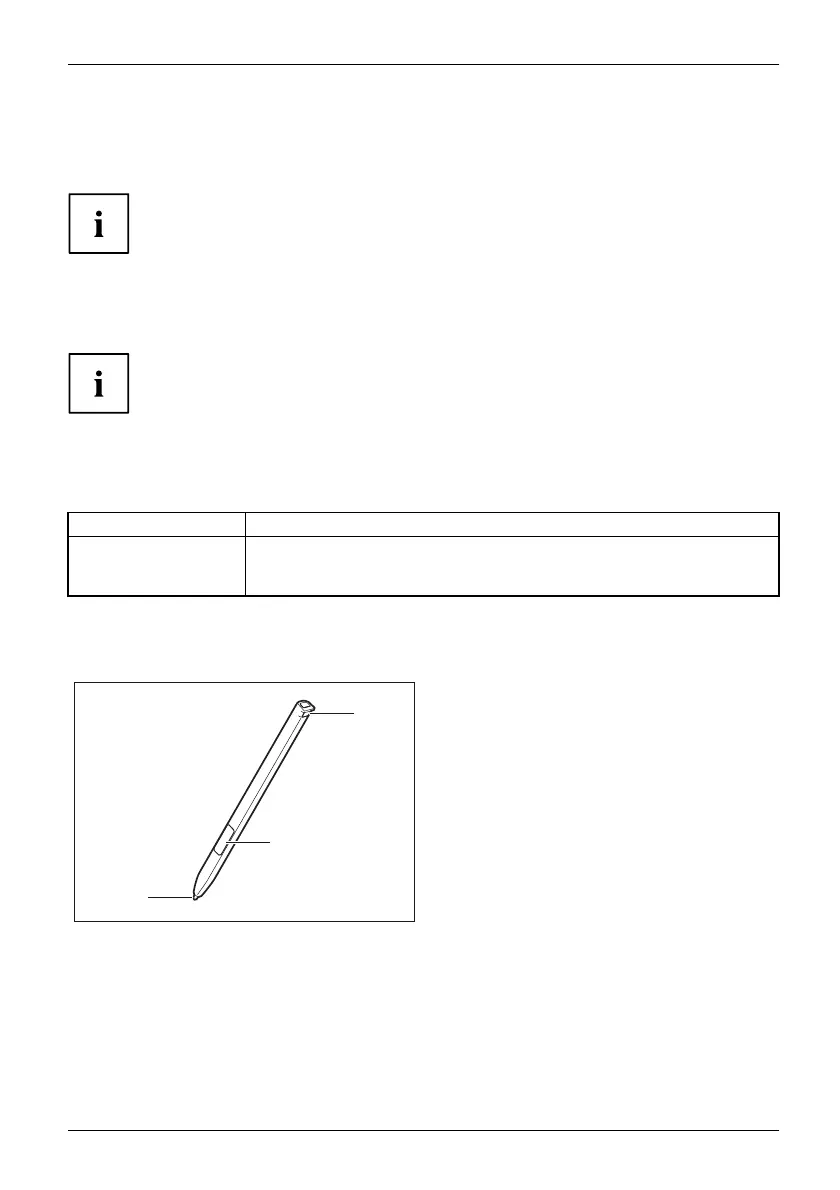
Using the pen (optional, dependent on configuration)
Pen
1
2
3
1 = pen tip
2 = pen b utton (= right mouse button)
3 = eyelet for optional p en tether
You can use the pen on your Tablet PC as an electronic writing implement to select items, and to
navigate through programs on it. Program s that support handwriting recognition also allow you to
write characters directly on the screen with the pen. You can also use the pen as a drawing tool.
A pen tether is available as an optional extra, w hich you can tie to the eyelet
on the pen an d to the eyelet on the tablet PC.
Fujitsu 25















 To Next Page