1. OPERATION
1-16
Typing mode
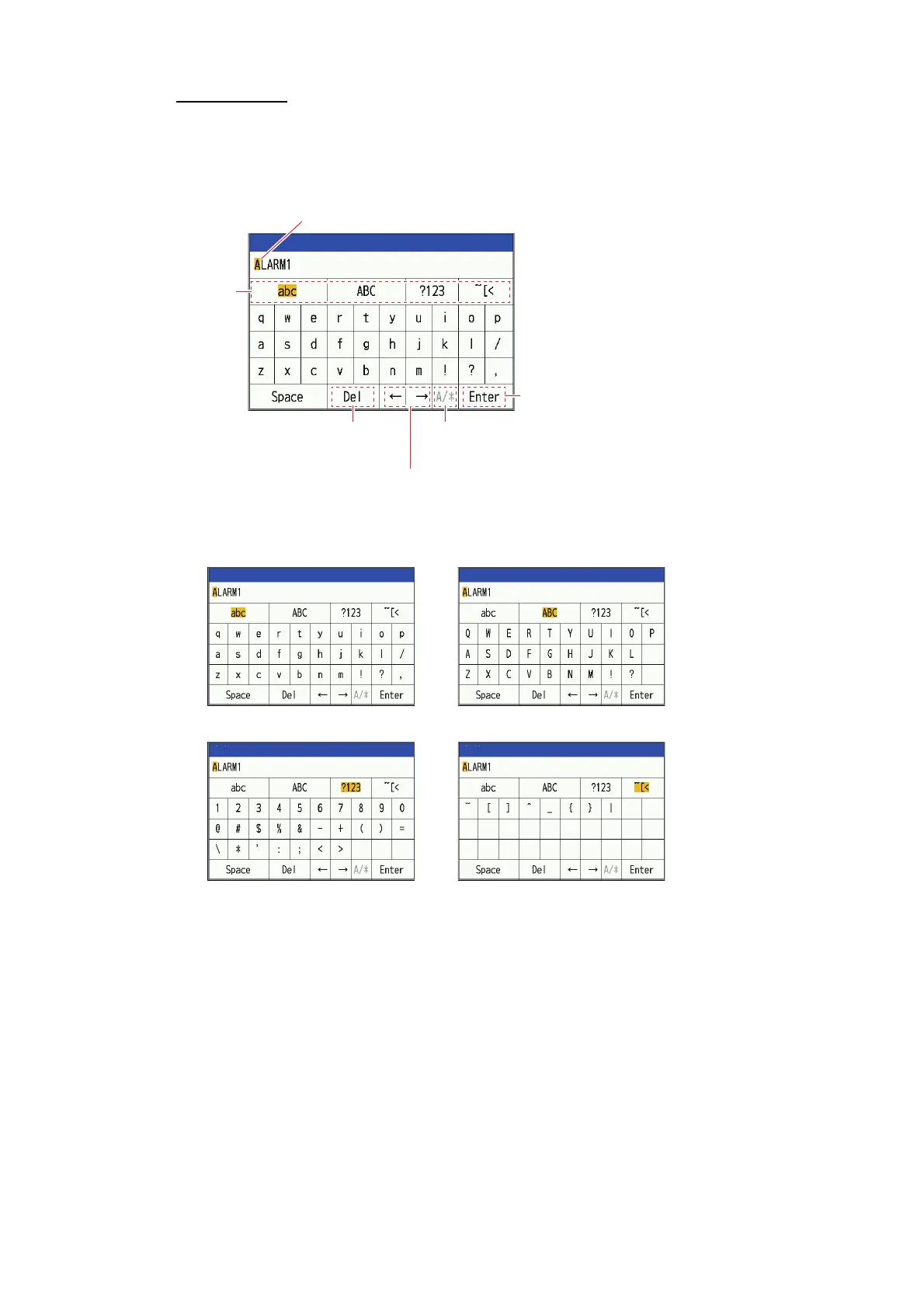
When you select an item that requires text input, the following input window will ap-
pear. You can input alphabetic characters (lower and upper letters), numbers and
symbols.
1. Select typing mode (abc, ABC, ?123,
~
[<) and press the KNOB.
2. Select character and press the KNOB.
3. Repeat step 1 to step 2 ans input all the characters.
To erase a character, select [] or [], press the KNOB and move the cursor to
the character you want to erase. Select [Del] and press the KNOB.
4. Select [Enter] and press the KNOB.
Text entry cursor
Typing Mode
Valid only for password input
Switch display between plaintext and ciphertext
Erase characters at the
text input cursor position
Confirm
Move the text entry
cursor position
Name
㼀㼥㼜㼕㼚㼓㻌㼙㼛㼐㼑㻦㻌㻭㼘㼜㼔㼍㼎㼑㼠㻌㻔㼘㼛㼣㼑㼞㼏㼍㼟㼑㻌㼘㼑㼠㼠㼑㼞㼟㻕 㼀㼥㼜㼕㼚㼓㻌㼙㼛㼐㼑㻦㻌㻭㼘㼜㼔㼍㼎㼑㼠㻌㻔㼡㼜㼜㼑㼞㼏㼍㼟㼑㻌㼘㼑㼠㼠㼑㼞㼟㻕
㼀㼥㼜㼕㼚㼓㻌㼙㼛㼐㼑㻦㻌㻺㼡㼙㼑㼞㼕㼏㼍㼘 㼀㼥㼜㼕㼚㼓㻌㼙㼛㼐㼑㻦㻌㻿㼥㼙㼎㼛㼘
Name
Name
Name
Name



 To Next Page