3. MAINTENANCE, TROUBLESHOOTING
3-4
3.5 Diagnostics
If you feel your unit is not working properly, conduct the diagnostic test to find the prob-
able cause. If you cannot restore normal operation, contact your dealer for advice.
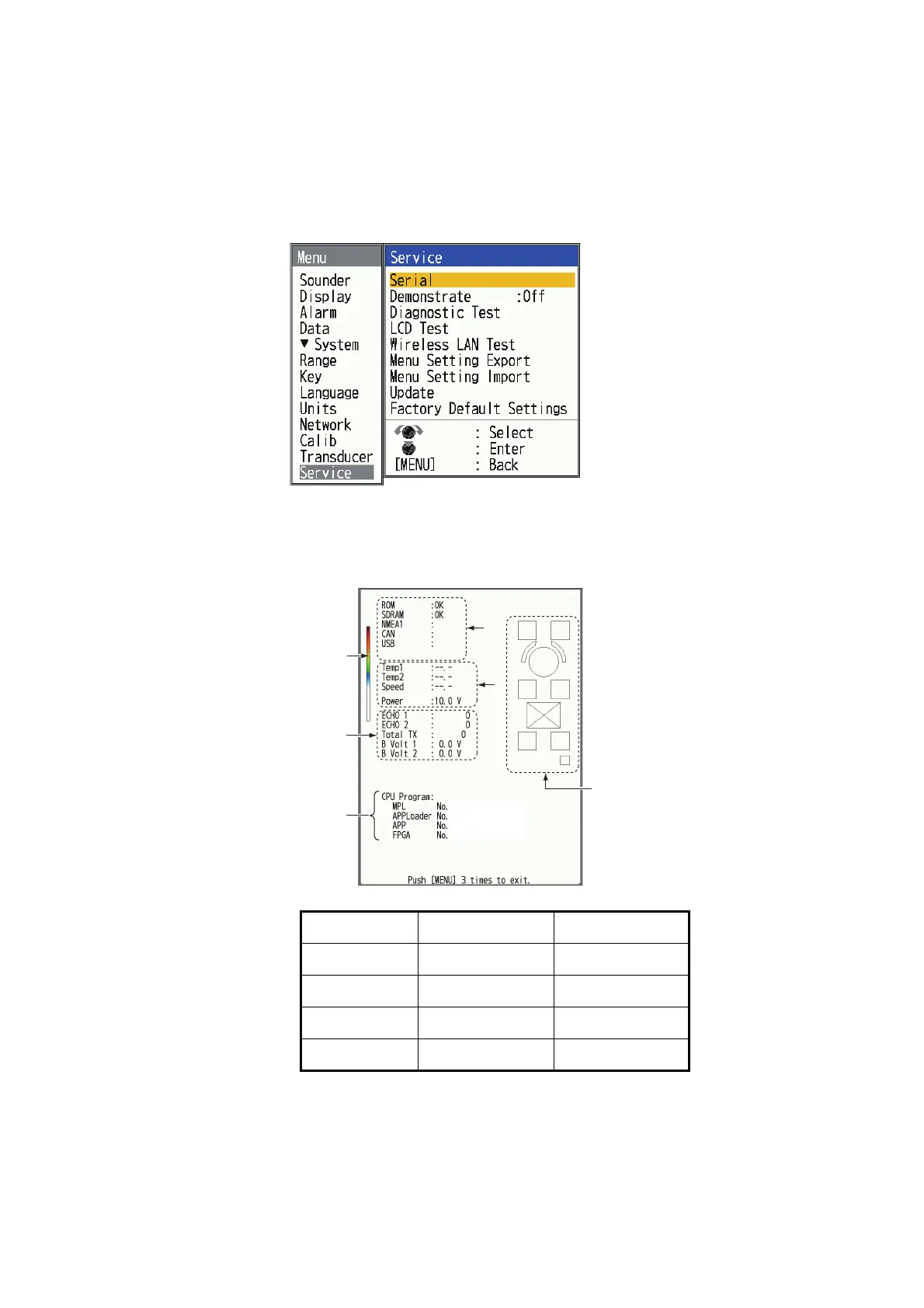
1. Press the MENU/ESC key to open the menu.
2. Select [Service], then press the KNOB.
3. Select [Diagnostic Test], then press the KNOB.
The test result will be displayed as shown below. If "NG" is displayed, please con-
tact FURUNO or your local dealer for repair.
XX.XX=version no.
Prog. FCV-600 FCV-800
MPL 0252483-XX.XX 0252487-XX.XX
APPLoader 0252484-XX.XX 0252488-XX.XX
APP 0252485-XX.XX 0252489-XX.XX
FPGA 0252486-XX.XX 0252486-XX.XX
Color bar
Program no.
Control check
Factory use
0252XXX-XX.XX
0252XXX-XX.XX
0252XXX-XX.XX
0252XXX-XX.XX
1
2



 To Next Page