3E1151SmartScale800UserManual
65
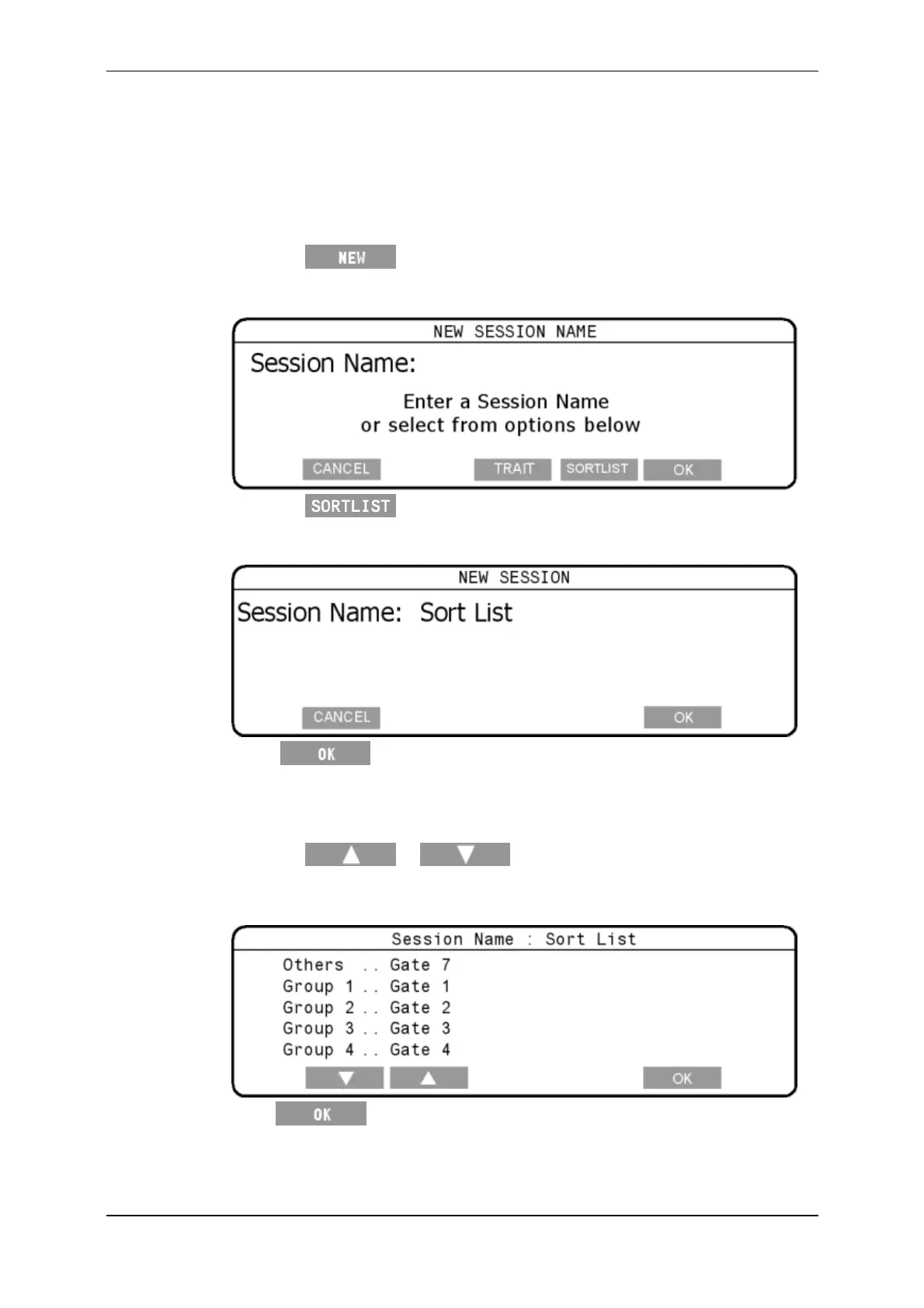
SelectingtheSortListandsettinggates
ToselectaSortListsession,completethefollowingsteps:
1. TurnthemodeselectswitchtoA(Automatic)ifloadbarsareconnectedorM
(Manual)ifyouarenotweighing.
2. Pressthe softkey.
TheNEWSESSIONscreendisplays.
3. Pressthe softskey.
TheNEWSESSIONscreendisplays
4. Press
.
Note:Thesessionnamecannotbechanged.
5. Settherequiredgatesforeachdisplayedsortgroup.
Pressthe
or softkeys,toselecttherequiredsort
group.
Usethekeypadtosettherequiredgatenumber(s).
6. Press ,tosavetheSortlistsessiondetails.
Note:Youdonotneedtochangethesortlimit,asitisnotusedduringasortlist
session.


 To Next Page
 Loading...






