3E1151SmartScale800UserManual
Page29
Selectcountry
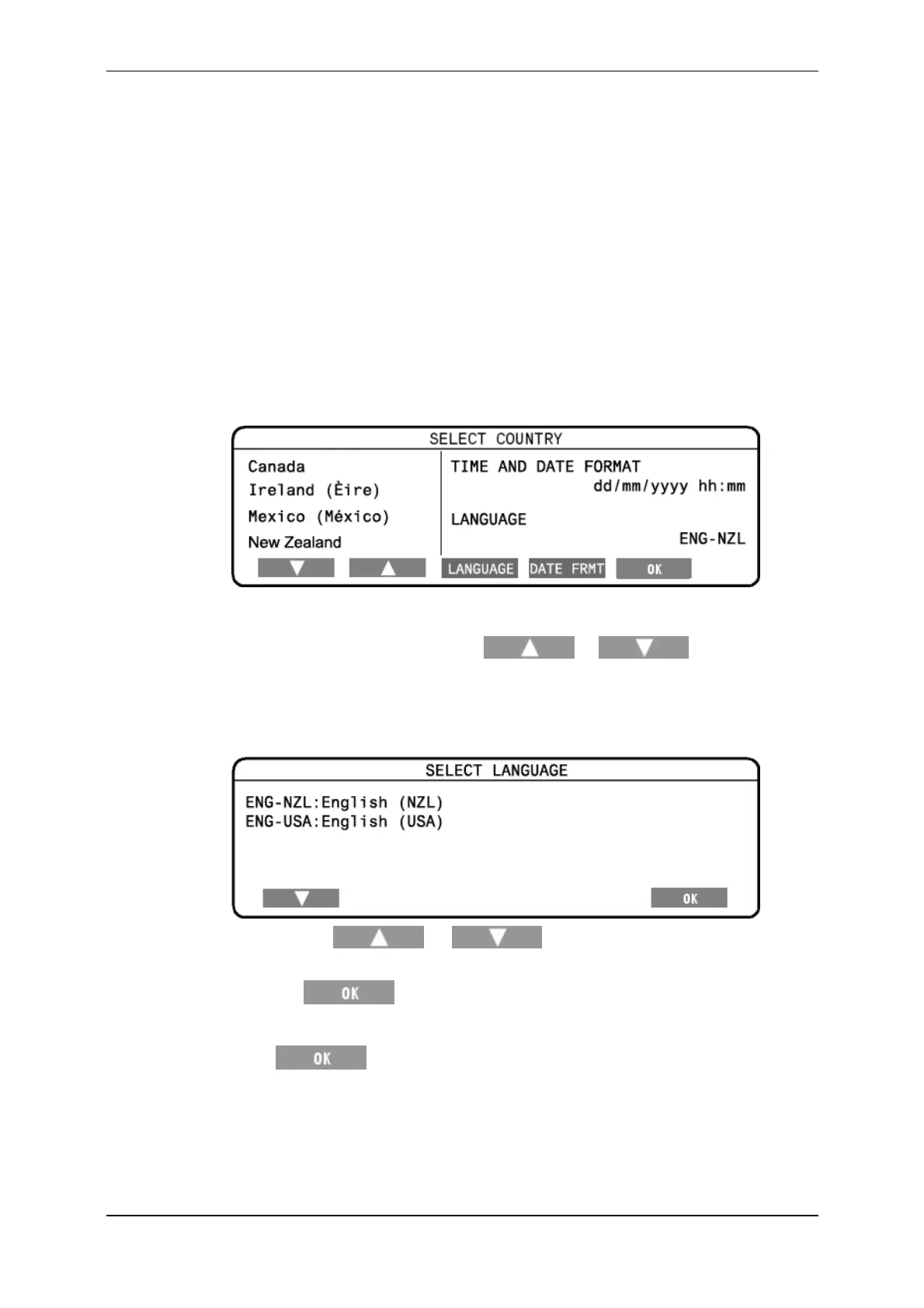
TheSelectCountrymenuletsyouselecttherequiredcountrysettings.
TheScalecountrysettingsdeterminethefollowing:
thelanguageusedwiththescreensandprompts;
somecountry‐specificterminology;and
somedefaultoptions.
TodisplaytheSelectCountrymenu,completethefollowingsteps:
1. TurnthemodeselectionswitchtoS.
2. SelectSELECTCOUNTRY.
Thefollowingscreendisplays:
Changingthecountryandlanguage
1. Tochangethecountry,pressthe or softkeyto
selectthedesiredcountry.
2. Tochangethelanguage,presstheLanguagesoftkey.
Thefollowingscreendisplays:
Pressthe or softkeytoselectthedesired
language.
Press tosavethelanguage.
TheselectedlanguagewillbedisplayedontheSelectCountryscreen.
3. Press tosavethechangestotheSelectCountryscreen.
IMPORTANT:EnsurethatthecountrysetonyourScaleisthesameasthe
countrysetinMyScalePro.
Toobtainfurtherlanguagefiles,refertoChangeMyScalePro'slanguage
settinginyourMyScaleProUserManual.



 To Next Page