Garmin © 2005–2006 65 nüvi Owner’s Manual
aPPendix
About Satellite Signals
Your nüvi must acquire satellite signals to operate. If you are indoors, near tall buildings or trees, or in a
parking garage, the nüvi cannot acquire satellites. Go outside to an area free from tall obstructions to use
your nüvi, or close the antenna to turn off GPS and use it indoors.
When the nüvi has acquired satellite signals, the signal strength bars on the Menu page are green .
When it loses satellite signals, the bars turn red or disappear .
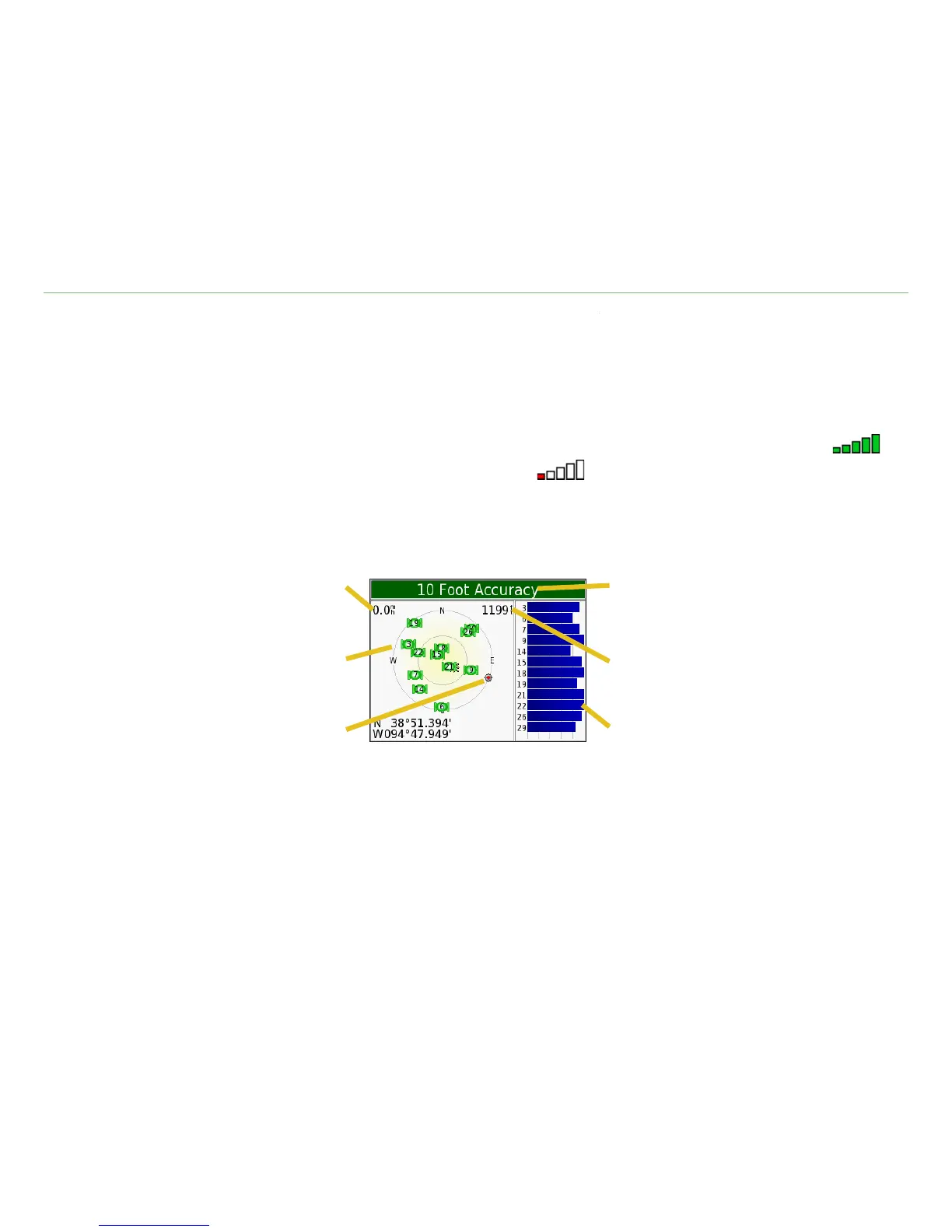
Touch the signals strength bars in the upper left corner of the Menu page to view GPS information. Touch
any where on the screen to return to the Menu page.
GPS StatusSpeed
Satellite signal strength bars
Sky view
Elevation
Direction of travel
The sky view shows the satellites you are receiving. The satellite signal strength bars indicate the strength
of each satellite you are receiving.
For more information about GPS, visit the Garmin Web site at www.garmin.com/aboutGPS.













 To Next Page