50 Astro Dog Tracking System Owner’s Manual
GPS Applications
To add a proximity location:
1. Access GPS Applications > select Proximity to open
the Proximity Location page.
2. Select an empty line, and press ENTER to open the
Find Menu.
3. Select a location from the Location List or from any
other group of map points, and press ENTER to open
the information page for the item.
4. Select Use to add the point to the list on the Proximity
Location page.
5. Select Radius if you want to enter a value different
than the default of 1 mile.
To select alarm tones and turn proximity alarms
on or off:
1. Select Proximity Alarm Tones to open the Proximity
Alarm Tones Setup page.
2. Select each alarm eld and press ENTER to view the
list of tones.
3. Select the desired tone and press ENTER.
4. Activate the alarms by placing a check at the
bottom of the page. Speed Alerts are proximity points
obtained from services provided by using POI Loader.
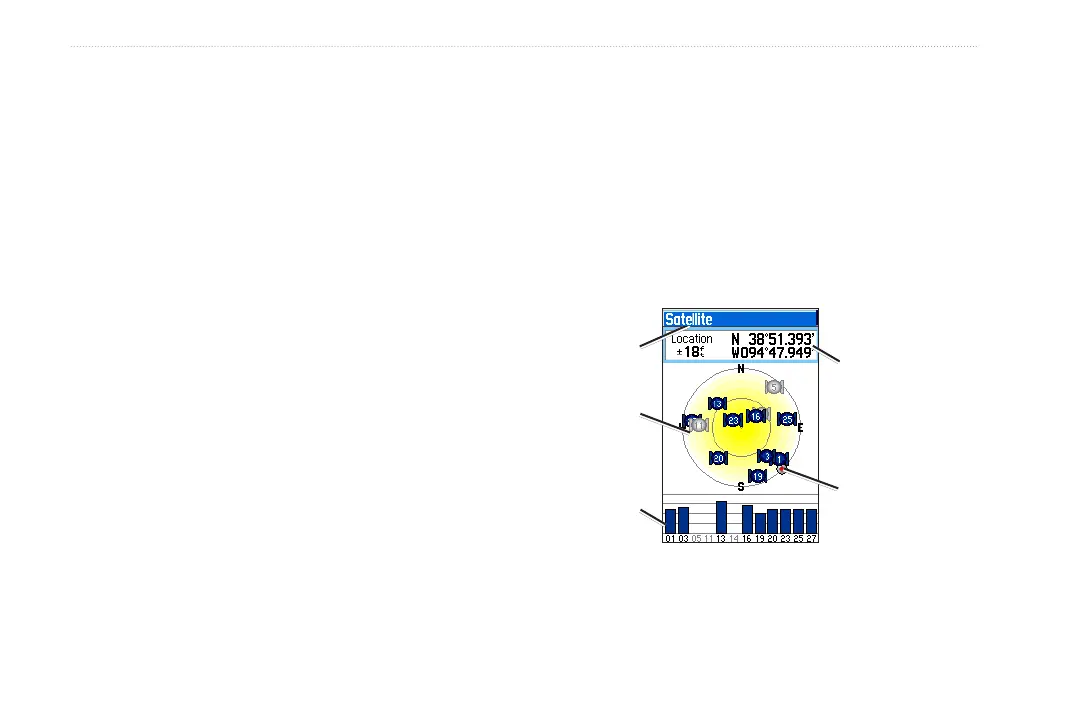
Satellite Page
The Satellite page shows the receiver status, satellite
locations, satellite signal strength, and the receiver’s
current location when the unit receives signals from at
least three satellites.
Heading bug
indicates your
direction of
movement
Satellite
signal
strength
Location
Receiver
status
Satellite Page
Satellite
location






 To Next Page