iv Astro Dog Tracking System Owner’s Manual
Introduction
Failure to avoid the following potentially hazardous situations
could result in an accident or collision resulting in death or
serious injury.
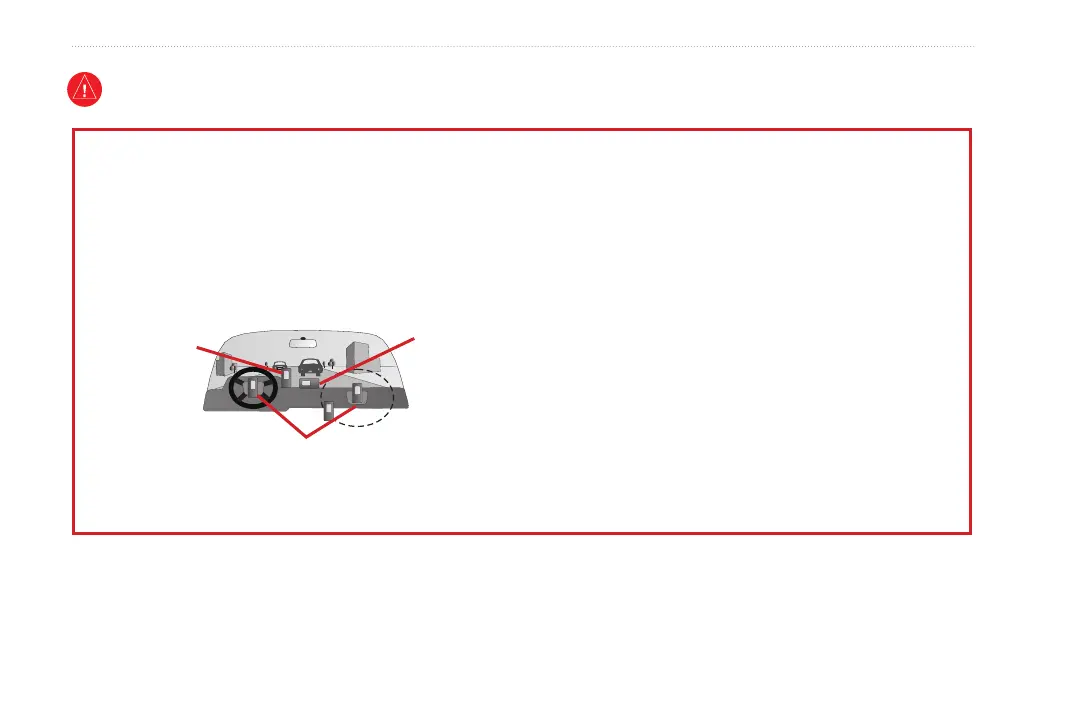
When installing the unit in a vehicle, place the unit securely so
that it does not obstruct the driver’s view of the road or interfere
with vehicle operating controls, such as the steering wheel, foot
pedals, or transmission levers. Do not place in front of or above
any airbag. (See diagram).
Do not mount
where driver’s
eld of vision is
blocked.
Do not place
unsecured on
the vehicle
dashboard.
Do not mount in front of an airbag
eld of deployment.
•
When navigating, carefully compare information displayed
on the unit to all available navigation sources, including
information from street signs, visual sightings, and maps. For
safety, always resolve any discrepancies or questions before
continuing navigation and defer to posted road signs.
Always operate the vehicle in a safe manner. Do Not become
distracted by the unit while driving, and always be fully
aware of all driving conditions. Minimize the amount of time
spent viewing the unit’s screen while driving and use voice
prompts when possible. Do not input destinations, change
settings, or access any functions requiring prolonged use of
the unit’s controls while driving. Pull over in a safe and legal
manner before attempting such operations.
This unit is designed to provide route suggestions. It is not
designed to replace the need for driver attentiveness regarding
road closures or road conditions, trafc congestion, weather
conditions, or other factors that may affect safety while driving.
•
•
•
Warning
WARNING: This product, its packaging, and its components contain chemicals known to the State of California to cause cancer, birth defects, or
reproductive harm. This Notice is provided in accordance with California’s Proposition 65. See www.garmin.com/prop65 for more information.






 To Next Page