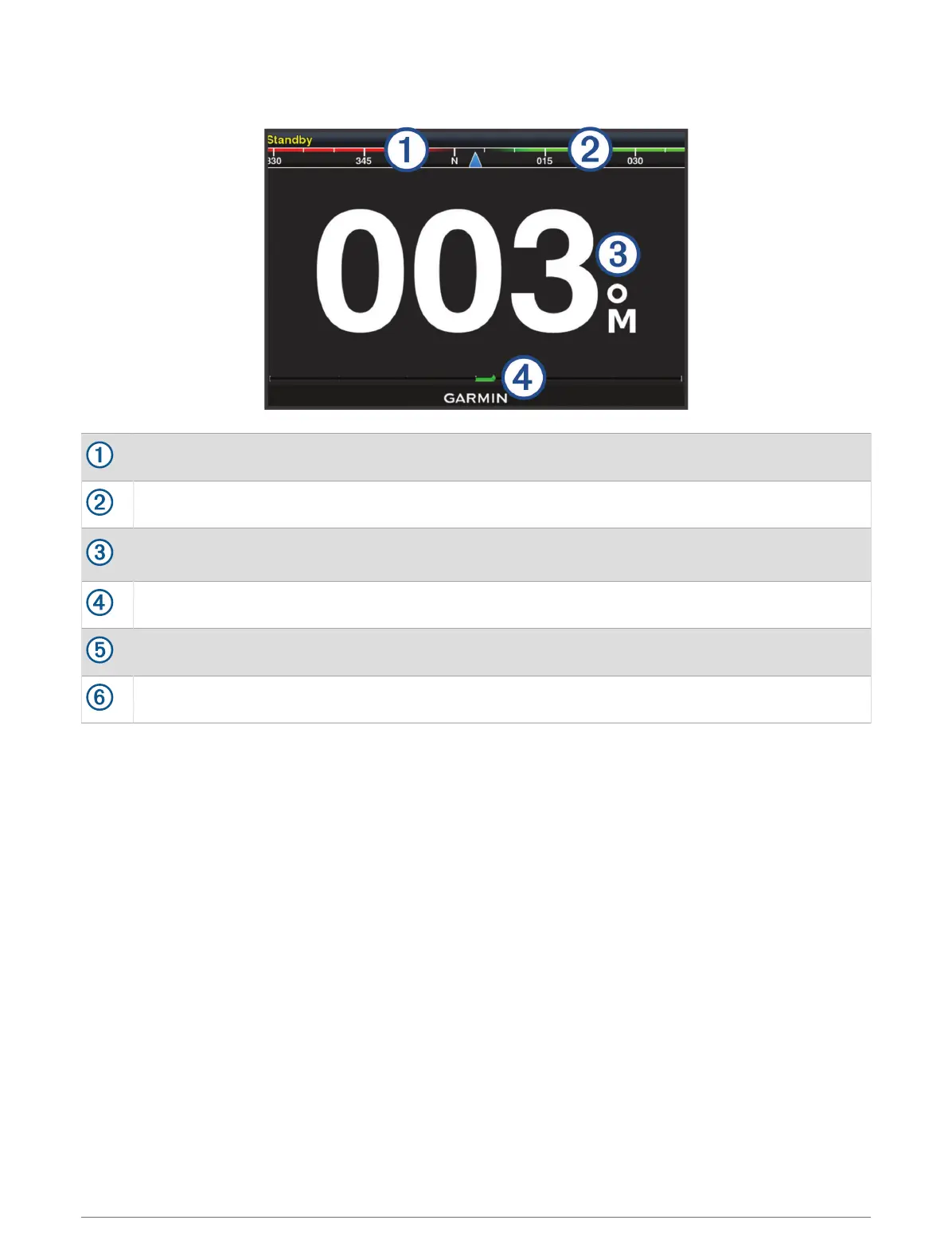
Autopilot Screen
Actual heading
Intended heading (heading the autopilot is steering toward)
Actual heading (when in standby mode)
Intended heading (when engaged)
Rudder position indicator (available when a rudder sensor is connected)
Step turn to port (to adjust the intended heading by amount shown)
Step turn to starboard (to adjust the intended heading by amount shown)
Adjusting the Step Steering Increment
1 From the autopilot screen, select MENU > Autopilot Setup > Step Turn Size.
2 Select an increment.
Setting the Power Saver
You can adjust the level of rudder activity.
1 From the autopilot screen, select MENU > Autopilot Setup > Power Mode Setup > Power Saver.
2 Select a percentage.
Selecting a higher percentage reduces rudder activity and heading performance. The higher the percentage,
the more the course deviates before the autopilot corrects it.
TIP: In choppy conditions at low speeds, increasing the Power Saver percentage reduces rudder activity.
76 Autopilot





 To Next Page