GNS 430 Pilot’s Guide and Reference
1-2
SECTION 1
INTRODUCTION
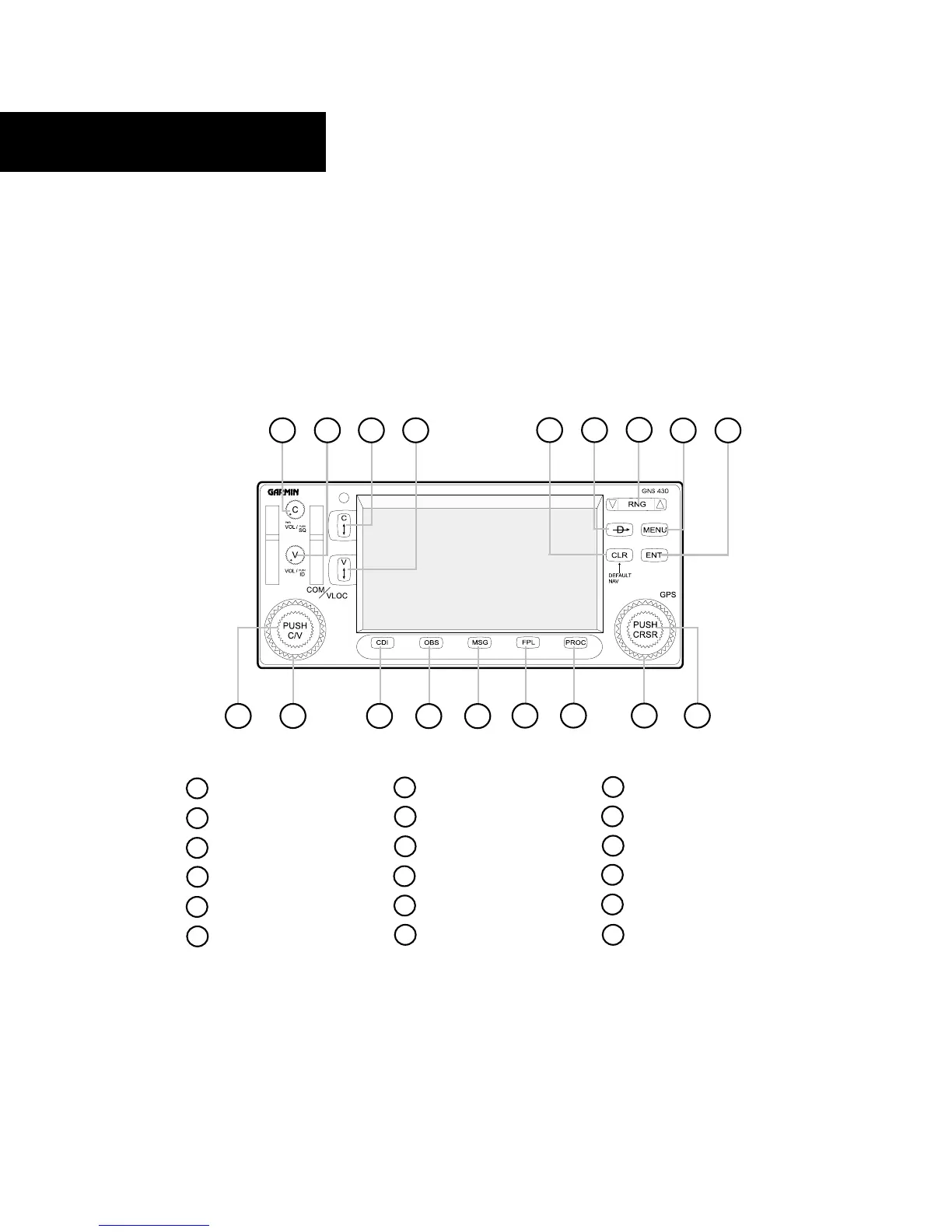
1.2 KEY AND KNOB FUNCTIONS
The GNS 430 is designed to make operation as simple
as possible. The key and knob descriptions (Figure
1-1) provide a general overview of the primary function(s)
for each key and knob. The takeoff tour (Section 1.3)
is intended to provide a brief overview of the primary
functions of the GNS 430.
Large left knob Large right knob
Small left knob
Small right knob
CDI
OBS
MSG (message)
FPL (flight plan)
PROC (procedur
es)
VLOC Volume
COM Power/Volume
VLOC Flip-flop
COM Flip-flop
CLR (clear)
ENT (enter)
MENU
RNG (map range)
Direct-to
1
2
3
4
5
6
7
8
9
10
11
12
13
14
15
16
17
18
4
63
2
5
8
9
7
1
10
11 12
13 14
15 16
17
18
Figure 1-1 Keys and Knobs
Experiment with the unit and refer to the reference
sections for more information.
Data is entered using the large and small knobs.
Experiment with them to become efficient at entering data.
This greatly reduces the amount of time spent operating
the GNS 430 in flight.





 To Next Page