GNS 430 Pilot’s Guide and Reference
7-24
SECTION 7
WPT PAGES
To delete a user waypoint from the User
Waypoint List:
1) Select the User Waypoint List, as described in
this section.
2) T
urn the large right knob to highlight the
desired user waypoint.
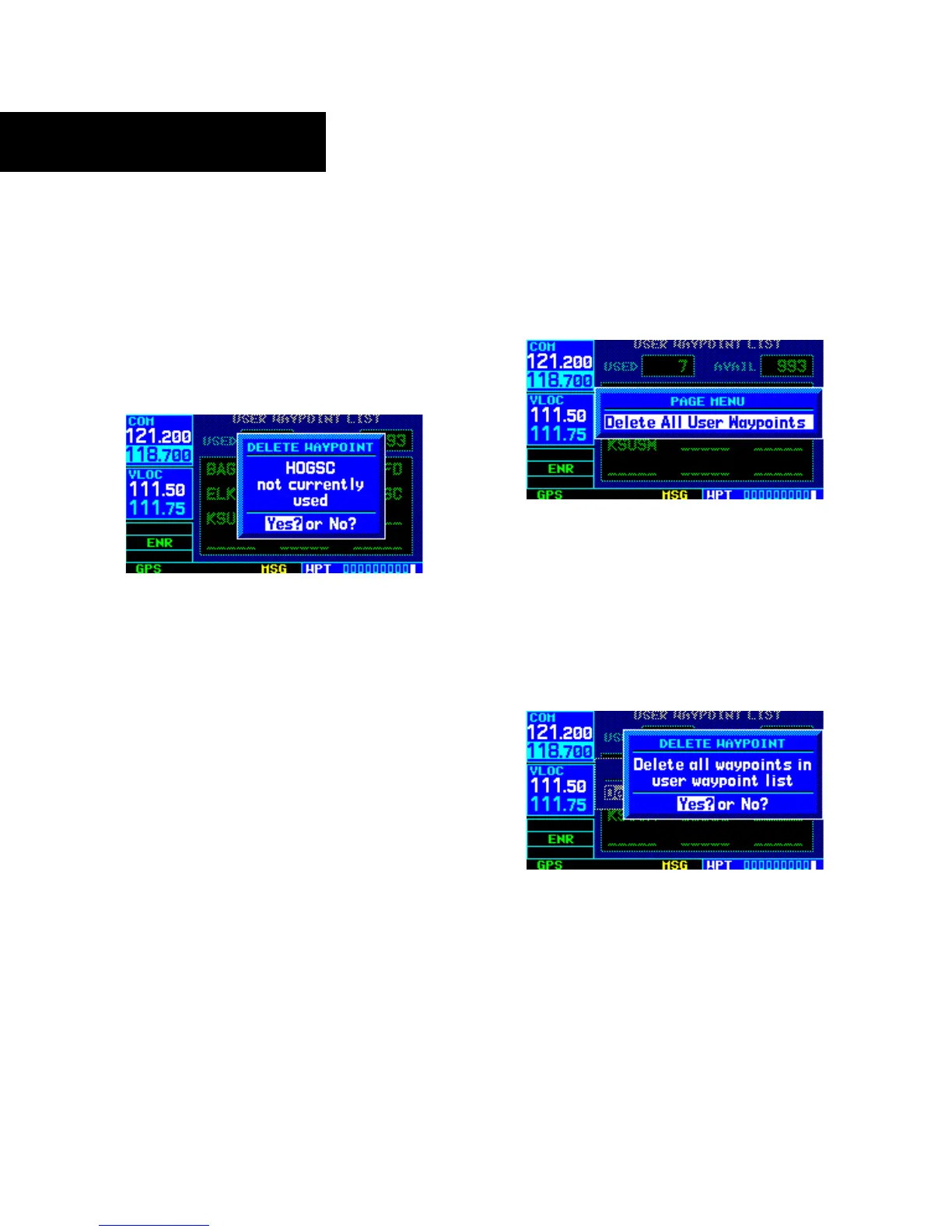
3) Press the CLR Key to display a ‘delete waypoint’
confirmation window (Figure 7-55).
Figure 7-55 Delete Waypoint Window
4) With ‘Yes?’ highlighted, press the ENT Key to
delete the selected user waypoint.
To delete all user waypoints from memory:
1) Select the User Waypoint List, as described in
this section.
2) Press
the MENU Key to display a menu for the
User W
aypoint List (Figure 7-56).
Figure 7-56 User Waypoint List Page Menu
3) With ‘Delete All User Waypoints’ highlighted,
press the ENT Key.
4) A ‘delete all waypoints’ confirmation window
is displayed (Figure 7-57). With ‘Yes?’
highlighted, press the ENT Key to delete all
user waypoints from memory
.
Figure 7-57 Delete All Waypoints Window



 To Next Page