GNS 430 Pilot’s Guide and Reference
5-15
SECTION 5
FLIGHT PLANS
The ‘Activate Leg?’ option is discussed previously in
this section, which allows the pilot to specify which leg of
the flight plan is used for navigation guidance. A shortcut
also exists for this operation, using the Direct-to Key.
To activate a specific leg of the active flight
plan:
1) Press the small right knob to activate the
cursor and turn the large right knob to
highlight the desired destination waypoint
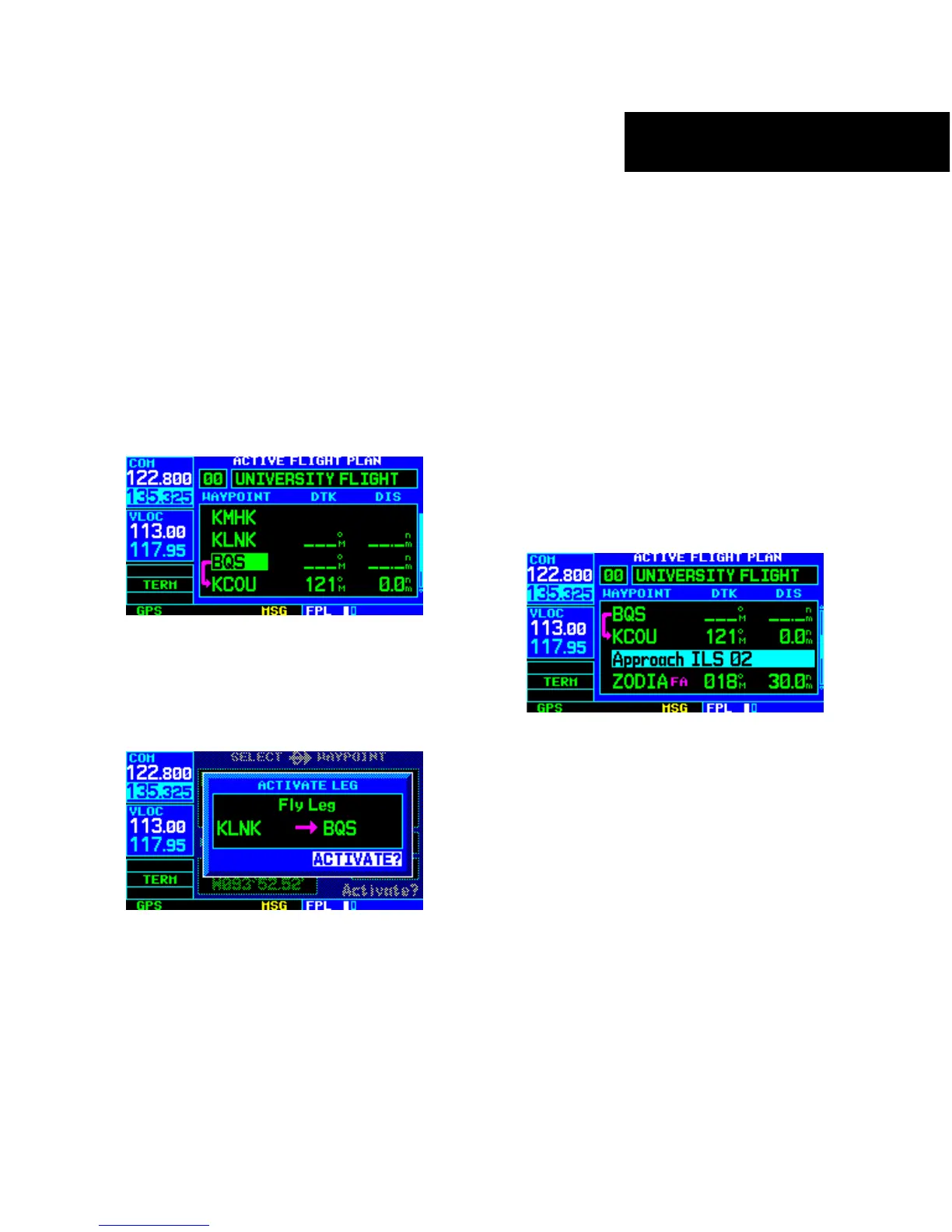
(Figure 5-35).
Figure 5-35 Destination Waypoint Highlighted
2) Press the Direct-to Key twice to display an
‘Activate Leg’ confirmation window (Figure
5-36).
Figure 5-36 Activate Leg Window
3) With ‘Activate?’ highlighted, press the ENT
Key.
When using instrument procedures, this feature can be
used not only to activate a specific point-to-point leg, but
to also activate the procedure turn portion of an approach,
follow a DME arc, or activate a holding pattern.
Any approach, departure, or arrival can be reviewed on
the appropriate airport page in the Waypoint Page Group
(Section 7.1).
To review a procedure while viewing a
flight plan page:
1) With a flight plan page displayed, press the
small right knob to activate the cursor.
2) T
urn the large right knob to highlight the
procedure header (Figure 5-37) and press the
ENT Key to select the WPT Page Group
.
Figure 5-37 Procedure Header Highlighted





 To Next Page