34 Garrett Metal Detectors
ATX
™
35
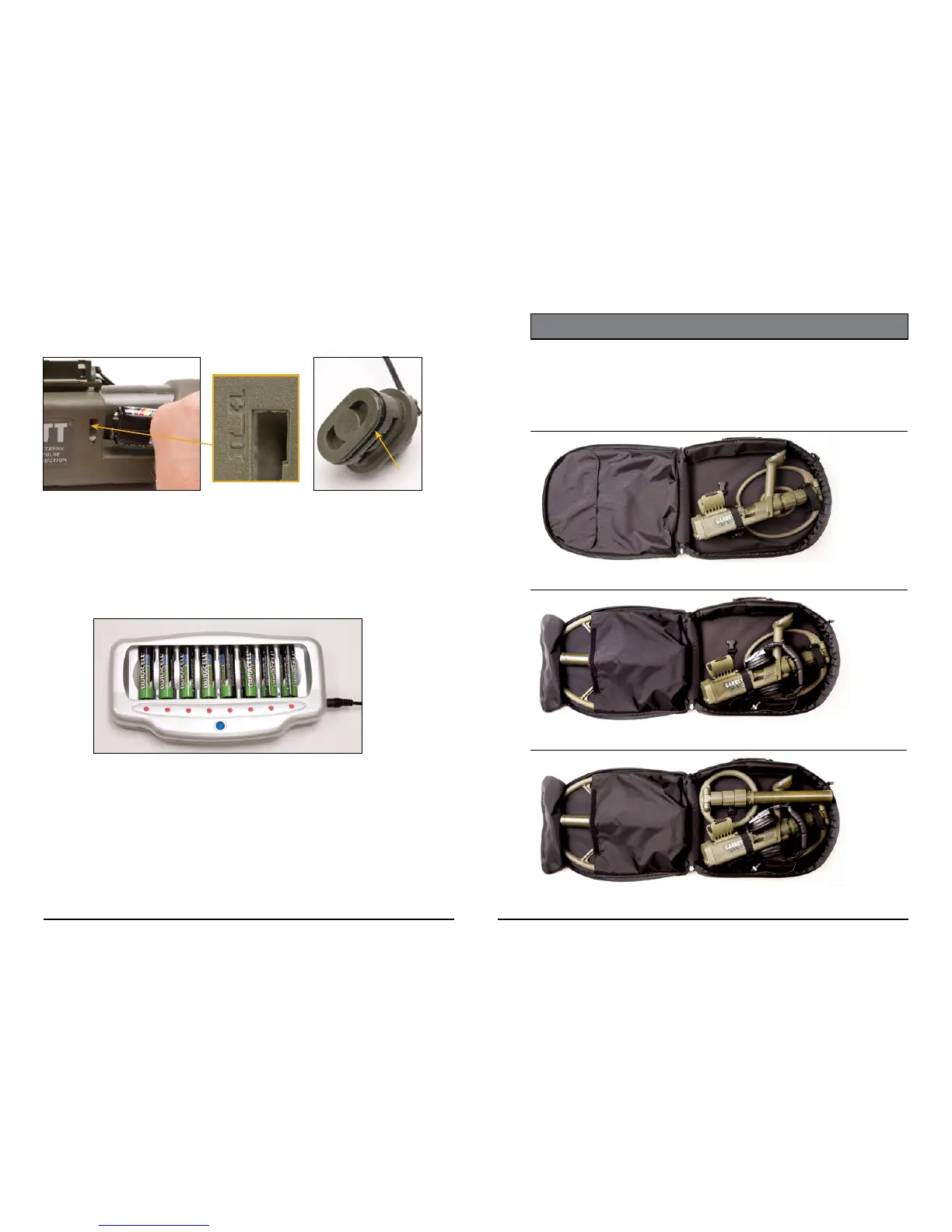
Battery Charging
In addition to its factory-installed alkaline batteries, the ATX also includes
one set of rechargeable batteries� Use the charger included to recharge
batteries� The charger accepts from one to eight AA batteries at a time for
charging (see below)�
Caution: Use only Ni-MH type batteries on this charger� Do not attempt
to recharge lithium, alkaline or carbon batteries�
Eight individual LEDs indicate charging status for each battery� Steady Red
LED indicates rapid charging in progress� Steady Green LED indicates the
battery is fully charged� Flashing Red LED indicates the battery is faulty or
not suitable for charging� Flashing Green LED indicates the battery is under-
going a discharge cycle�
Figure 3 Figure 4
(Detail view of ±
polarity markings)
sure to lubricate the O-rings on each battery cover with silicone grease (see
Figure 4)�
O-Ring
STORING ATX IN SOFT CASE
The soft carry case included with the ATX protects the detector during travel
and when not in use� When properly arranged, it can hold the ATX, optional
searchcoils and accessories, as shown on the following pages�
ATX with standard DD coil attached
Figure 1: ATX with DD coil attached.
Secure straps around lower stem nut and housing.
Figure 3: ATX with DD coil attached + Deepseeker coil + headphones + 8" mono coil.
Note: close velcro flap to secure Deepseeker coil.
Figure 2: ATX with DD coil attached + Deepseeker coil + headphones.
Note: close velcro flap to secure Deepseeker coil.












 To Next Page