ORIUS ™ 833 User’s Guide Series Rev 3 2-3
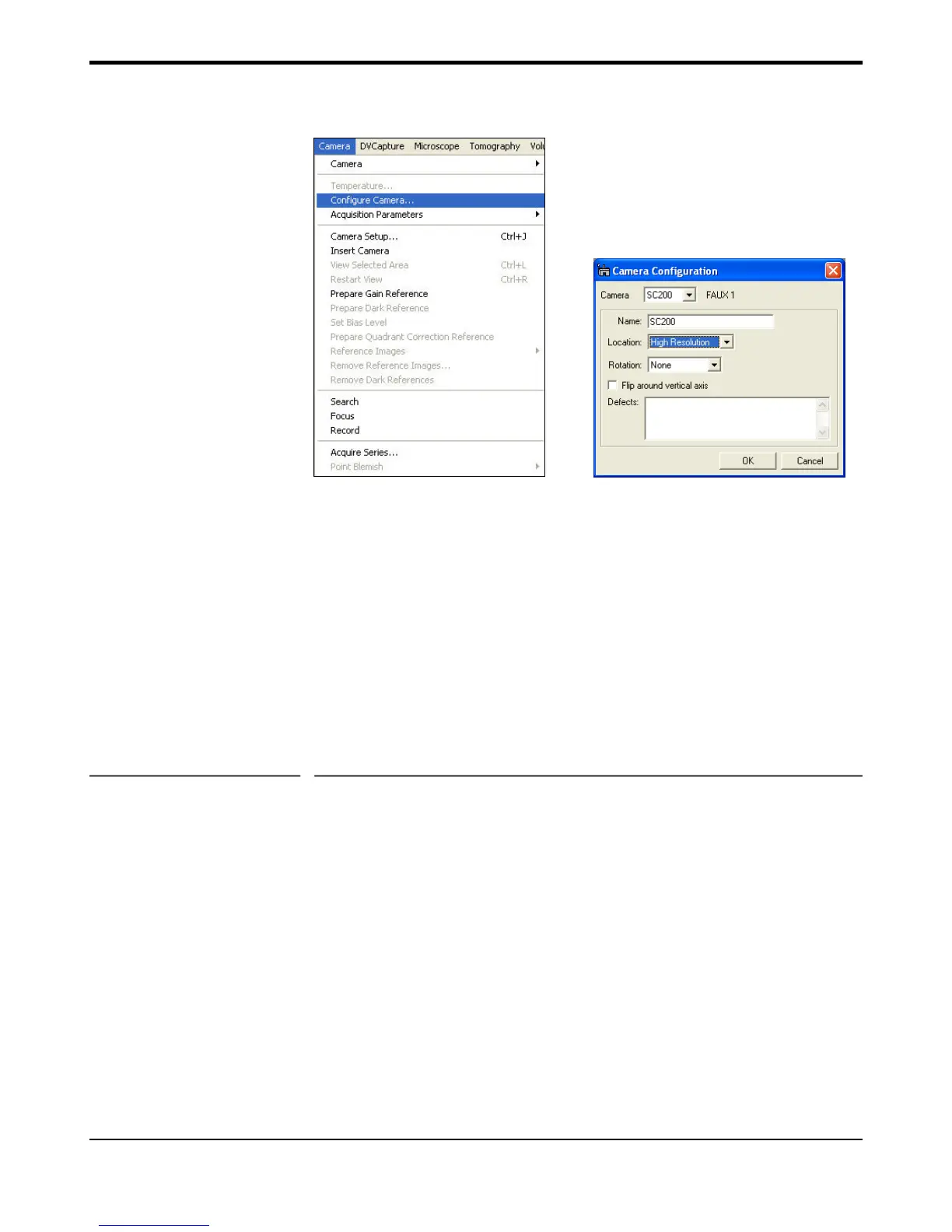
Figure 2-2 (a) Camera Menu (b) Camera configuration
• Select Configure Camera in the Camera menu (Figure (2-2a).
• In the Camera configuration dialog box (Figure 2-2b), you can change
the name of the camera by typing in the Name field.
• Image rotation can be specified in the Rotation pull-down menu.
• The shutter state should only be setup IF the camera was configured
with the optional shutter for this camera
2.3 Dark Correction
• After the camera has cooled to its operating temperature of 10°C, a
calibration of the bias or thermal counts is required. This is often
referred to as the “dark image”.
Quick tip: A dark reference image set must be taken before preparing a
gain reference.
• To prepare a dark reference image obscure the camera, either by
lowering the TEM screen, retracting the camera or turning off the
TEM beam.
• Under the camera menu select “Prepare dark reference”.
• Wait about 15 minutes for the procedure to complete.
• It should not be necessary to repeat this more that once per week and
may be good indefinitely.


 To Next Page