40
WWW.GATEE.EU
USER GUIDE
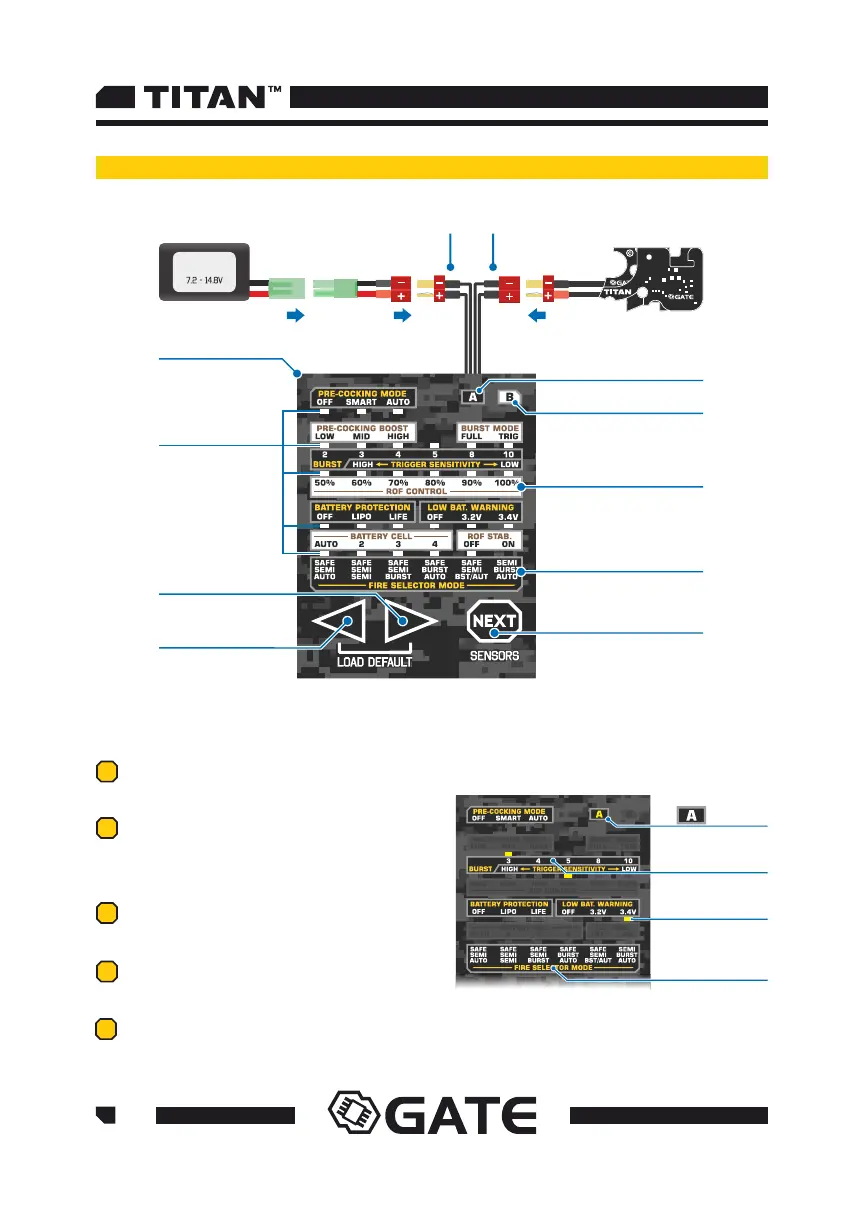
5.2 How to use the Tactical Programming Card
DROP-IN
MODULE
LEDS
TACTICAL
PROGRAMMING CARD
BUTTON RIGHT
BUTTON LEFT
BATTERY CONNECTOR
B ICON
WHITE DISPLAY
BLACK DISPLAY
BUTTON NEXT
CONTROLLER CONNECTOR
BATTERY
01
A ICON
02
03
ICON ON
BURST - 3
corresponding
LED
FIRE
SELECTOR MODE
SAFE/SEMI/AUTO
The basic operations and adjusting main settings:
04
05
Connect the battery to the Programming
Card. The LEDs light on and start blinking.
Connect the airsoft gun with TITAN inside to
the Programming Card. All current settings
are displayed on the corresponding LEDs.
When the icon A is ON, check only on the
black display of Programming.
When the icon B is ON, check only on the
white display of the Programming Card.
Click button NEXT to switch between
functions and A/B displays.



 To Next Page