Y35 HD v3
User Manual & Install Guide
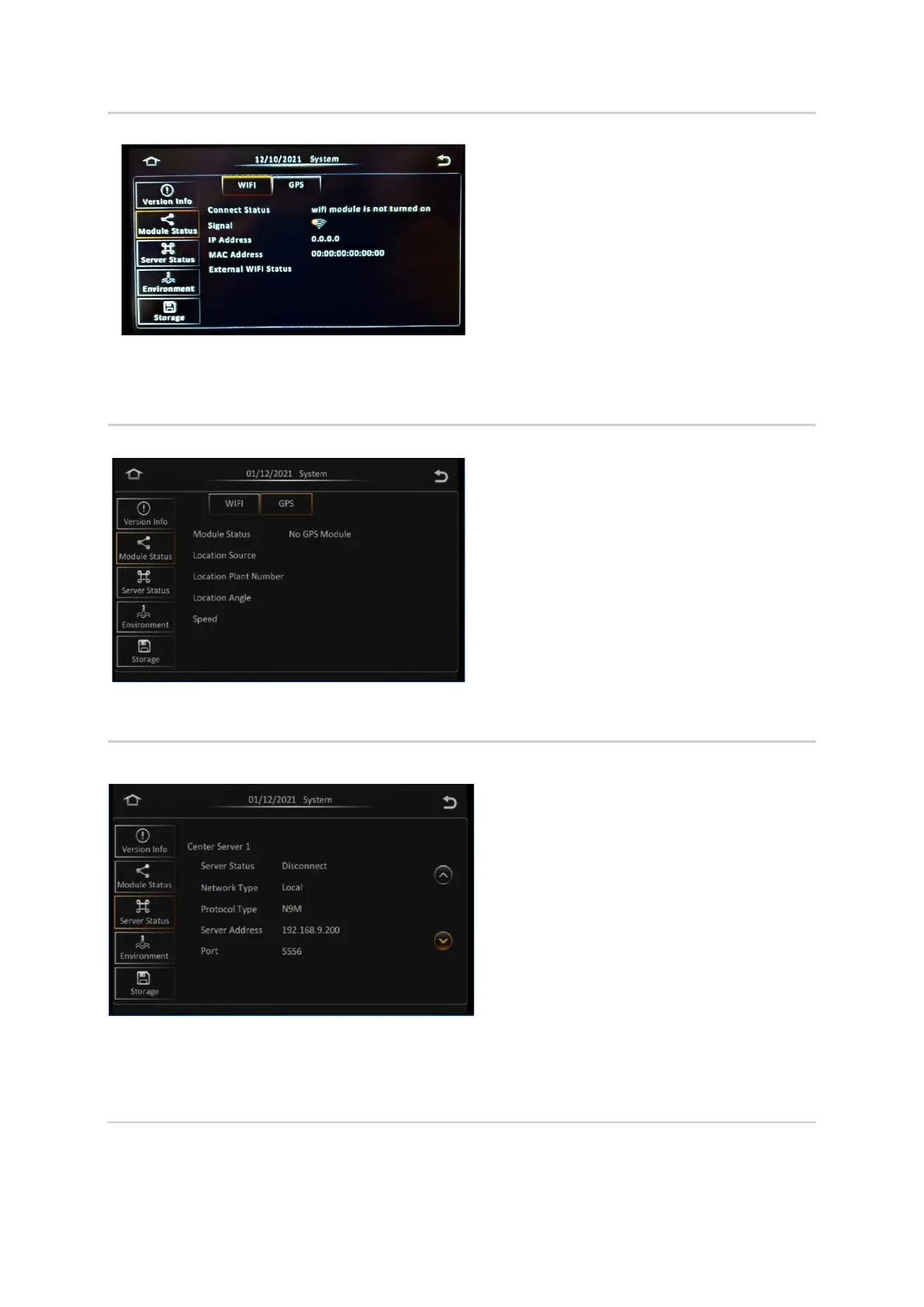
This screen shows a summary of the Wi-Fi
statuses for the Y35 HD v3.
There are two types of Wi-Fi Statuses with
similar information displayed:
• Built-in Wi-Fi
- Connect Status
- Signal
- IP Address
- MAC Address
• External Wi-Fi
- ESSID
- IP Address
- MAC Address
This screen shows a summary of the GPS of the
Y35 HD v3.
• Module status defines the physical
location of the Y35 HD v3 using GPS co-
ordinates.
• Location source defines where the
Location is sourced.
• Location Plant Number is an internal
marker.
• Location angle is the degrees east of
true north.
• Speed is the speed of the vehicle when
the location was relayed to the Y35 HD
v3.
4. Server Status
This screen shows the details of the Center Server that
the device is setup for connection to (summarising the
connection status and type, as well as the connection
address and port number).
Note: These settings are only applicable when the
device is setup for a network connection within a
Gatekeeper Wireless Configuration.
The information shown is as follows:
▪ Server Status
▪ Network Type
▪ Protocol Type
▪ Server Address
▪ Port
You can click the (^) and (v) buttons to scroll
through the status information for different
servers which are set up in the system.



 To Next Page